Keyboards

Keychron V1 Ultra 8K

verified Excellent

Best For

  • Competitive gamers seeking minimal latency
  • Typists who appreciate responsive switches
  • Users needing long-lasting battery life

Consider Carefully

  • Those seeking a sturdy, flex-free build
  • Heavy typists who prefer flat keycaps
  • International buyers due to US-only availability

The Bottom Line

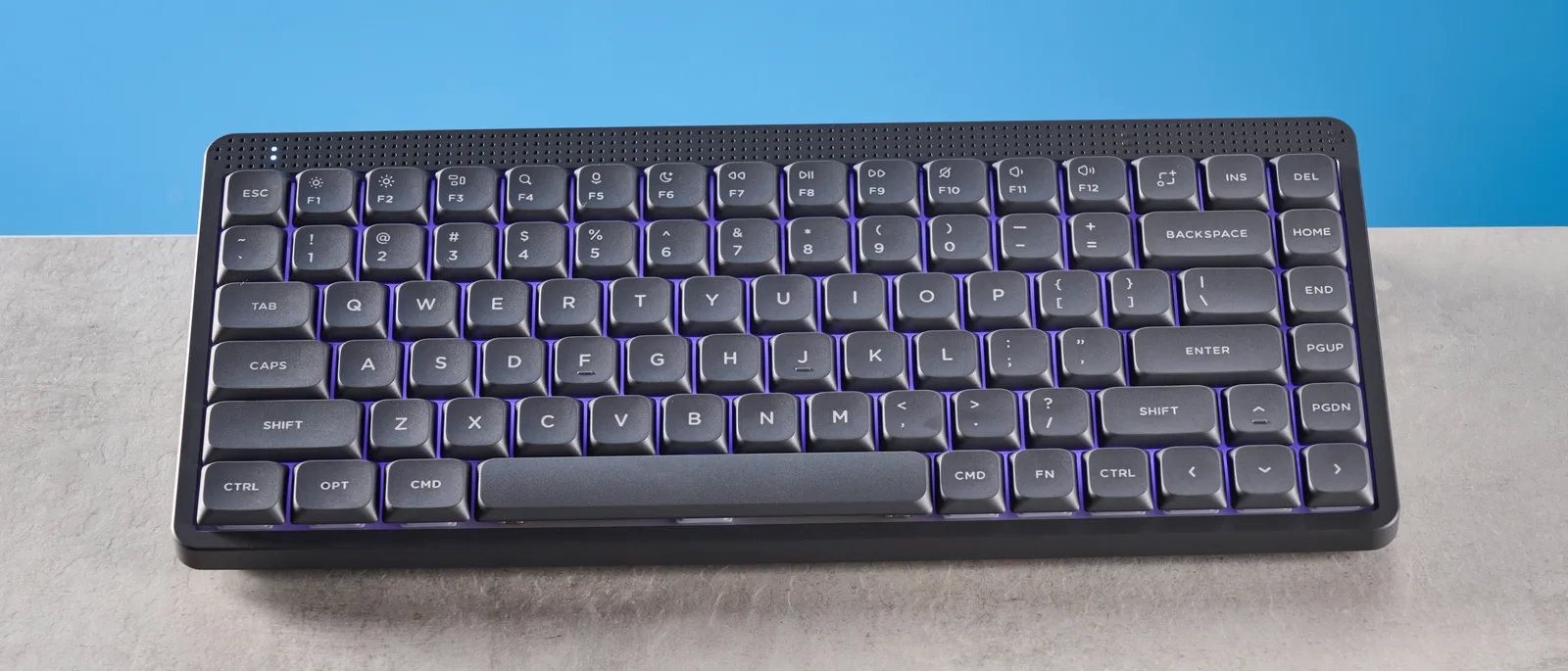
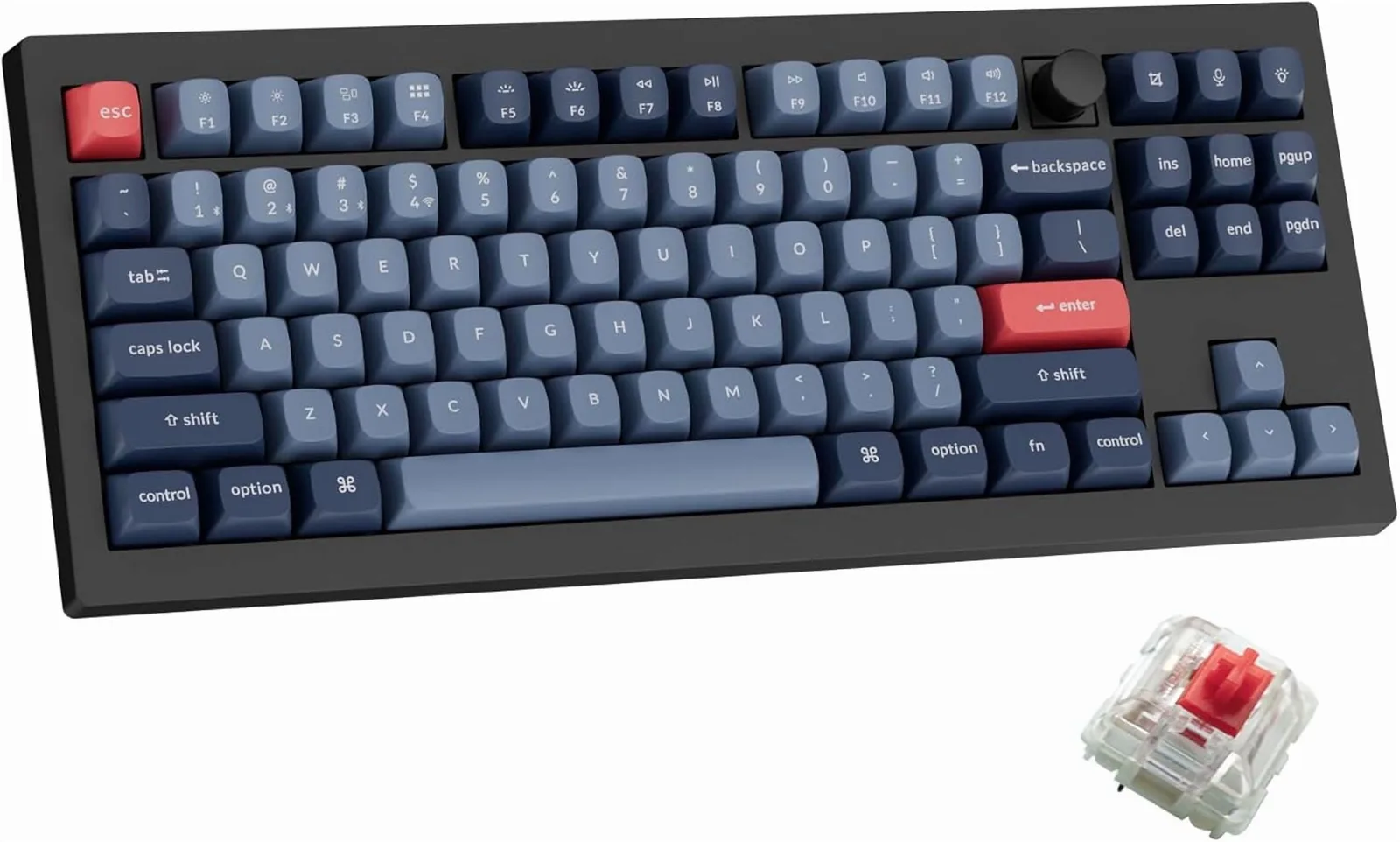
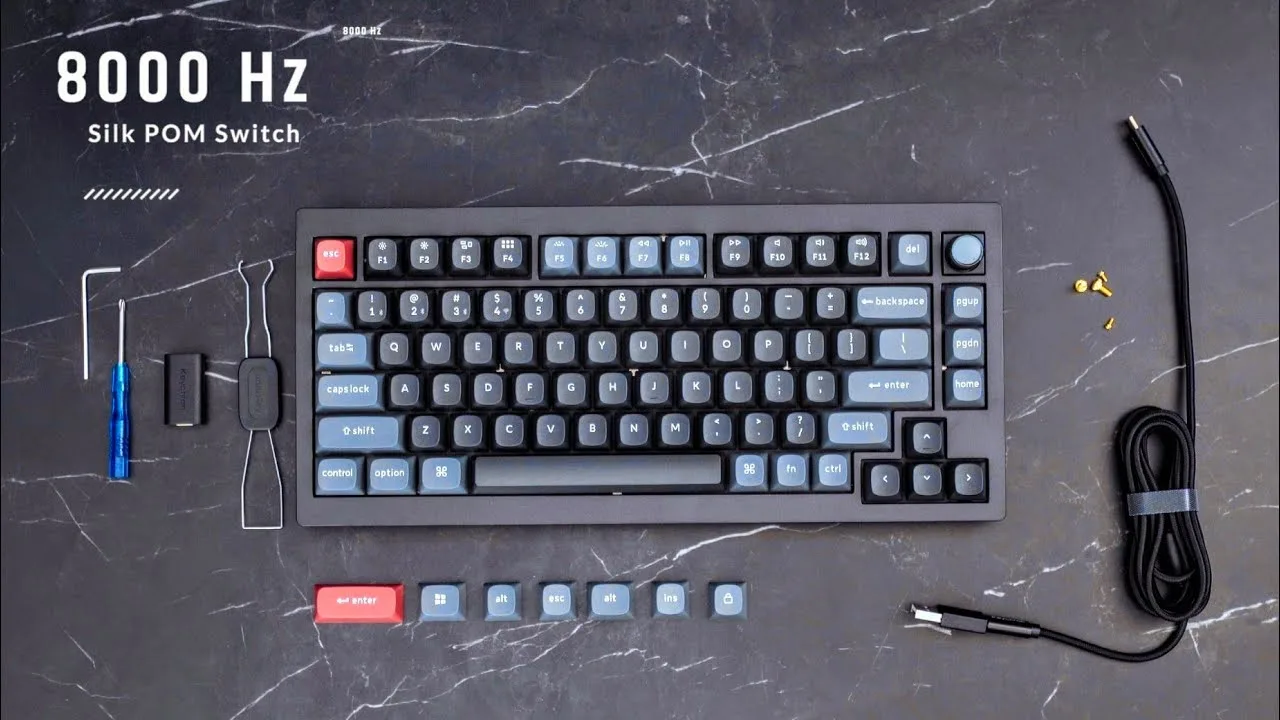
The Keychron V1 Ultra 8K is a wireless mechanical keyboard that's making waves among competitive gamers and typists who value a smooth, responsive typing experience. We found it to stand out with its 8,000Hz polling rate and hot-swappable Silk POM switches, offering a typing feel that several sources described as 'delightful'. Its 660-hour battery life, as noted by techradar.com, is exceptional, and the dual RGB lighting systems provide extensive customization. However, this keyboard isn't without its compromises; a plastic shell that flexes and a limited colorway are points of contention raised by some reviewers.

Performance Breakdown

In-Depth Analysis

Wireless Performance 94

Unanimous consensus · 6 sources

8,000Hz polling rate in both wired and 2.4GHz wireless modes puts this keyboard in rare company for a $114 board. Four sources confirm it, no dissent.

Key Takeaway

If wireless polling rate matters to your setup, this is one of the few keyboards at this price that actually delivers 8K wirelessly.

In-Depth Analysis

Wireless Performance

Unanimous consensus · 6 sources
94 / 100

Most keyboards at this price cap wireless polling at 1,000Hz. The V1 Ultra hits 8K wirelessly, which Tom's Guide says 'eliminates latency and input lag' outright. The Verge and TechRadar both flag this as the headline spec for competitive gamers, and Tom's Hardware calls it 'ideal for wireless-first gamers needing high polling rates.' There's no meaningful disagreement across the six sources covering this. If low-latency wireless is your primary concern, this keyboard delivers it at a price that undercuts most competitors offering the same.

What Reviewers Say

"8,000Hz wireless polling rate for gaming responsiveness"

Theverge

"8,000Hz wireless polling eliminates latency and input lag"

tomsguide.com

"8,000Hz polling rate available in wired and 2.4GHz modes"

mediaberry.co.uk

"Ideal for wireless-first gamers needing high polling rates"

tomshardware.com

Strengths

8,000Hz polling rate available in wired and 2.4GHz modes (4 sources)

Fantastic gaming performance from responsive switches (1 sources)

Nuances

Strong choice for competitive gamers needing minimal input latency (4 sources)

Battery Life 93

Unanimous consensus · 5 sources

660 hours of battery life at 8K polling with the backlight off. Five sources agree, and none push back.

Key Takeaway

If you want a wireless keyboard you almost never have to charge, this is a serious option.

In-Depth Analysis

Battery Life

Unanimous consensus · 5 sources
93 / 100

That number sounds made up, but The Verge and TechRadar both cite it directly, crediting ZMK firmware's power efficiency. Tom's Hardware notes the ZMK stack is specifically optimized for wireless longevity, which explains how Keychron gets there without sacrificing the high polling rate. The practical upshot: this is a keyboard you charge a few times a year, not a few times a week. For travelers or anyone running a clean desk without cable clutter, that matters more than it sounds.

What Reviewers Say

"Exceptional battery life up to 660 hours with backlight off"

Theverge

"660-hour battery life at 8K polling rate wirelessly"

tomshardware.com

"660-hour battery life with ZMK firmware"

techradar.com

"660-hour battery life is exceptionally long"

tomsguide.com

Strengths

660-hour battery life at 8K polling rate wirelessly (5 sources)

ZMK firmware optimized for wireless power efficiency (1 sources)

Nuances

Battery life suits travelers or those wanting minimal charging (5 sources)

Software & Customization 92

Strong consensus · 7 sources

A browser-based configurator with no downloads, onboard memory, and open-source ZMK firmware. Four sources call it out as a genuine strength.

Key Takeaway

If you want deep customization without software bloat, this setup is hard to beat at the price. QMK power users should factor in the ZMK adjustment period.

In-Depth Analysis

Software & Customization

Strong consensus · 7 sources
92 / 100

No software to install, no background processes running. The Keychron Launcher runs in a browser, saves to onboard memory, and works across devices. TechRadar calls it 'feature-rich' and The Verge confirms it simplifies ZMK configuration meaningfully. The one honest caveat: The Verge notes ZMK remapping is less polished than QMK alternatives, which matters if you're coming from a QMK board with deep muscle memory for the workflow. For most users, the web app is genuinely good. For power users who live in QMK, there's a learning curve.

Where Reviewers Disagree

The web-based Launcher is genuinely clean and capable, but The Verge flags ZMK remapping as less polished than QMK, which is a real consideration for enthusiasts switching ecosystems.

What Reviewers Say

"Browser-based Launcher simplifies ZMK configuration"

Theverge

"Feature-rich web app requires no software downloads"

techradar.com

"Onboard memory saves customizations across devices and modes"

mediaberry.co.uk

"Programmable knob supports mouse keys and macros"

notebookcheck.net

Strengths

Web-based Launcher app requires no downloads or background software (4 sources)

Onboard memory saves customizations across devices and modes (1 sources)

New 1MB Flash microcontroller for firmware (1 sources)

Programmable knob supports mouse keys and macros (1 sources)

Nuances

Open-source ZMK appeals to keyboard customization enthusiasts (3 sources)

Suits users needing extensive programmability (2 sources)

Switch Options 89

Strong consensus · 7 sources

Hot-swap support for 3-pin and 5-pin MX switches is the headline. The Banana switches impress three sources, but the 57g actuation force and weak Brown tactility are real caveats.

Key Takeaway

Pick the Banana switches over Browns if you want tactile feedback. Hot-swap support means you can always change your mind without soldering.

In-Depth Analysis

Switch Options

Strong consensus · 7 sources
89 / 100

The Silk POM Banana switches get consistent praise: The Verge calls them smoother with less scratchiness, Tom's Hardware flags the updated feel as a meaningful improvement over previous versions. Hot-swap compatibility means you're not locked in, which matters. The weaknesses are specific: Tom's Guide flags the Banana switches at 57g as heavy for extended typing, and The Verge is direct that the Brown switches lack a meaningful tactile bump. If you're choosing between the two, The Verge's advice is clear: go Banana for actual tactile feedback. The Browns are a compromise that doesn't fully satisfy either camp.

Where Reviewers Disagree

The Banana switches earn real praise for feel, but 57g actuation is heavy for all-day typing. The Browns are lighter but deliver so little tactile feedback that The Verge recommends against them.

What Reviewers Say

"Hot-swappable 3-pin and 5-pin MX-compatible switches"

mediaberry.co.uk

"Silk POM switches feel smoother with less scratchiness"

Theverge

"Silk POM Banana switches feel responsive and satisfying"

techradar.com

"Banana switches require heavy 57g activation force"

tomsguide.com

Strengths

Hot-swappable 3-pin and 5-pin MX-compatible switches (3 sources)

Silk POM Banana switches feel responsive and satisfying (3 sources)

Nuances

Great for tinkerers who enjoy switch swapping and RGB experimentation (2 sources)

Tactile switch fans preferring heavier 57g actuation force (1 sources)

Tactile switch options accommodate varied typing preferences (1 sources)

Choose banana switches for genuine tactile feedback (1 sources)

Typing Feel 85

Strong consensus · 5 sources

Reviewers like the typing feel, but the OSA sculpted keycaps and louder-than-expected sound profile are real caveats for office typists.

Key Takeaway

Great typing feel for enthusiasts willing to mod, but if you need quiet out of the box, look elsewhere.

In-Depth Analysis

Typing Feel

Strong consensus · 5 sources
85 / 100

Tom's Guide calls the double-shot PBT keycaps 'lovely to type on' and praises the switch responsiveness. The Verge highlights screw-in stabilizers that genuinely reduce wobble on larger keys, a detail that matters more than it gets credit for. The friction comes from two directions: TechRadar and Notebookcheck flag the OSA keycap profile as a preference issue, and The Verge notes the typing noise runs louder than predecessors. The r/MechanicalKeyboards community consensus adds useful context here, suggesting a keycap swap yields more improvement than a switch swap if you want a deeper, quieter sound. Out of the box, this isn't a quiet desk keyboard.

Where Reviewers Disagree

The typing experience is genuinely good, but the louder sound profile and polarizing OSA keycap shape mean it's not universally comfortable without some aftermarket adjustment.

What Reviewers Say

"Double-shot PBT keycaps feel lovely to type on"

tomsguide.com

"Upgraded screw-in stabilizers reduce key wobble"

Theverge

"Deeper, clackier typing sound compared to predecessors"

Theverge

"OSA keycaps may not suit all preferences"

notebookcheck.net

Strengths

Delightful typing feel with responsive, comfortable switches (1 sources)

Double-shot PBT keycaps feel lovely to type on (1 sources)

Upgraded screw-in stabilizers reduce key wobble (1 sources)

Deeper, clackier typing sound compared to predecessors (1 sources)

Nuances

Prioritize keycap upgrade before switch swap — community consensus from similar Keychron models suggests this yields significant sound improvement (1 sources)

Not ideal for those wanting a ready-to-use deep/quiet sound profile out of the box (1 sources)

Build Quality 83

Strong consensus · 7 sources

Four of seven sources flag noticeable flex in the plastic shell. At $114 it's expected, but it's the clearest trade-off on this keyboard.

Key Takeaway

Solid value at $114, but if chassis rigidity matters to you, this keyboard will disappoint. Consider aluminum alternatives before buying.

In-Depth Analysis

Build Quality

Strong consensus · 7 sources
83 / 100

The accessory bundle is generous, the PBT keycaps feel thick, and the screw-in stabilizers do their job. Keychron clearly put the budget in the right places. But four sources, including TechRadar, Notebookcheck, and Tom's Guide, all note the plastic case flexes along the front edge and under twisting pressure. Notebookcheck frames it plainly: plastic case instead of aluminum. The single colorway is a minor annoyance flagged by two sources. None of this is surprising at the price, and Notebookcheck notes the plastic actually helps with portability. If you're coming from an aluminum board, the flex will register immediately.

Where Reviewers Disagree

The feature set punches above the price, but the plastic shell with noticeable flex is a real compromise that four sources independently flagged.

What Reviewers Say

"Plastic shell shows noticeable flex along front edge and when twisted"

mediaberry.co.uk

"Double-shot PBT keycaps feel thick and premium"

mediaberry.co.uk

"Screw-in stabilizers eliminate rattle on larger keys"

mediaberry.co.uk

"Only available in single black colorway"

techradar.com

Strengths

Generous accessory bundle includes extra keycaps and platform-specific options (2 sources)

Competitive $114 price point for features offered (2 sources)

Double-shot PBT keycaps feel thick and premium (2 sources)

Minimalist black/gray design with orange accent fits offices (1 sources)

Nuances

Budget buyers seeking premium features without premium price (2 sources)

75-percent layout balances functionality and desk space (2 sources)

Consider alternatives if rigid build quality is top priority (1 sources)

Good choice for those wanting adjustable ergonomic angles (1 sources)

Connectivity Options 83

Strong consensus · 5 sources

Triple connectivity covers 2.4GHz, Bluetooth 5.3, and USB-C. The catch: it's currently US-only, which two sources flag as a hard blocker for UK buyers.

Key Takeaway

US buyers with multi-device setups get a genuinely flexible connectivity package. UK buyers can't purchase it at all right now.

In-Depth Analysis

Connectivity Options

Strong consensus · 5 sources
83 / 100

Three Bluetooth device slots plus 2.4GHz and wired USB-C covers most multi-device workflows without compromise. Tom's Hardware and TechRadar both confirm the triple connectivity setup. The availability issue is blunt: TechRadar and Tom's Guide both note US-only availability, which isn't a nuance for UK buyers, it's a dealbreaker. HiTechKing and Mediaberry highlight the multi-device flexibility as a genuine strength for desk setups juggling a laptop and desktop. If you're in the US and run multiple devices, the connectivity stack is well thought out.

Where Reviewers Disagree

The connectivity options are strong, but US-only availability makes the conversation short for anyone outside that market.

What Reviewers Say

"Triple connectivity: 2.4GHz, Bluetooth 5.3, USB-C"

techradar.com

"Excellent choice for multi-device workflows with three Bluetooth slots"

mediaberry.co.uk

"Well-suited for multi-device setups with three connectivity options"

HiTechKing

"Triple connectivity: 2.4GHz, Bluetooth, and wired"

tomshardware.com

Strengths

Triple connectivity: 2.4GHz, Bluetooth 5.3, and USB-C (3 sources)

Nuances

Excellent choice for multi-device workflows with three Bluetooth slots (2 sources)

RGB Lighting 77

Strong consensus · 3 sources

Dual-zone RGB with 20+ effects sounds impressive until you realize the solid PBT keycaps block most of the light.

Key Takeaway

If RGB is a priority, budget for shine-through keycap replacements. The lighting system is capable, but the stock keycaps work against it.

In-Depth Analysis

RGB Lighting

Strong consensus · 3 sources
77 / 100

All three sources covering this agree the customization depth is real: dual lighting zones, extensive effects, and serious setup potential. The problem is structural. TechRadar and Mediaberry both flag that solid PBT keycaps don't let light through, which visibly mutes the effect compared to shine-through alternatives. You're essentially paying for RGB that performs better on the desk surround than through the keys themselves. Tom's Guide frames it as a reward for enthusiasts willing to invest setup time, which is accurate but also a polite way of saying the out-of-box lighting underwhelms.

Where Reviewers Disagree

The dual-zone RGB system is genuinely deep, but solid PBT keycaps block the light, making the feature less impressive in practice than it reads on paper.

What Reviewers Say

"Dual-zone RGB with 20+ effects and deep customization"

techradar.com

"Dual RGB systems enable extensive lighting customization"

tomsguide.com

"No shine-through keycaps despite strong RGB"

techradar.com

"Solid PBT keycaps block RGB light, muting lighting effects"

mediaberry.co.uk

Strengths

Dual-zone RGB with 20+ effects and deep customization (3 sources)

Nuances

RGB enthusiasts willing to invest setup time will be rewarded (2 sources)

Specifications & Verdict

8,000Hz Polling Rate
75% / 82 keys Layout
2.4GHz, Bluetooth, wired Connectivity
4,000mAh / 660 hours Battery
Build
Case Material
plastic
Color
black with two shades of grey keycaps
Construction
ABS plastic
Firmware
ZMK open-source
Keycap Material
PBT
Keycap Profile
OSA
Knob Material
CNC aluminium
Mount
Gasket
Plate Material
polycarbonate
Stabilizers
screw-in
Connectivity
Connection Types
wired and 2.4GHz wireless
Connectivity
2.4GHz wireless, Bluetooth, wired
Nkro
wireless and wired
Paired Devices Max
3
Polling Rate
8,000Hz (2.4GHz, wired)
Polling Rate Modes
wired and 2.4GHz
Features
RGBEffects
more than 20 effects
RGBModes
per-key mode, Mix RGB mode
Backlighting
Full RGB
Hot Swappable
Yes
Hotswap Support
3-pin or 5-pin switches
Included Accessories
keycap removal tool, USB Type-A to Type-C adapter, extension adapter for wireless receiver, red replacement keycaps for Esc and Enter keys, alternate OS-specific keycaps
Knob Programmability
mouse keys, macros, regular key press actions
Multimedia Keys
Yes
Programmability
All keys macro-programmable via VIA software
Rgb Settings
over 22 including static white, per-key RGB, RGB mix
Software Compatibility
All major operating systems including Linux
Sound Dampening
Foam inside board
Volume Dial
true
Zmk Compatible
Yes
Layout
Form Factor
75%
Key Count
82 keys
Layout
75%
Logical Layout
US QWERTY
Physical Layout
ANSI
Physical
Battery
4,000mAh
Battery Life
measured in weeks
Battery Life Rated
660 hours
Front Height
21.5mm
Includes
USB-C cable, USB-C to USB-A adapter, extension adapter for receiver, USB-A 2.4GHz receiver, keycap and switch puller, screwdriver, hex key
Measurements
12.93 x 5.85 x 1.15 inches
Typing Angle
3.5°
Weight
1.69lbs
Switches
Switch Actuation Force
57g (Banana switches)
Switch Compatibility
3-pin or 5-pin MX-style
Switch Options
Red (linear, 45g), Brown (tactile, 55g), Banana (tactile, 57g)
Switch Type
Keychron Silk POM

Our Verdict

The Keychron V1 Ultra 8K is a good choice for those after a high-performance wireless keyboard with a great typing feel and long battery life. However, if you're sensitive to build flex or prefer a wider array of color options, this might not be the best fit.

Customer Reviews Amazon

5.0

5 reviews

Keychron V1 Ultra - Typing on Clouds!Keychron V1 Ultra - Typing on Clouds!

Tech EnthusiastTech Enthusiast March 21, 2026Reviewed in the United States on March 21, 2026
Brief content visible, double tap to read full content.Full content visible, double tap to read brief content.The keychron V1 Ultra is an amazing pick for those entering into the world of mechanical keyboards. Typing on this keyboard is like typing on clouds; the keys are smooth and have a thocky sound to them, albeit the letter and number keys sound more thocky than the other keys.Moreover, the keyboard itself feels premium and well-made. The rgb is sharp, vibrant and heavily customizable with over 20+ lighting patterns, per-key rgb, dual-rgb, and alot more.However, the main highlight of this keyboard is its easy of use. I daily drive Arch Linux, and the wireless connectivity of the keyboard works like a charm. And, since the rgb software is web-based, it’s fairly easy to customize the keyboard on Arch, although I had to change a udev rule for my system to recognize the keyboard.While I’ve only owned the keyboard for a couple days, I haven’t had to recharge the keyboard once.Overall, the Keychron V1 Ultra is an excellent keyboard and almost a steal at its price.Read moreRead less

Anonymous

Anonymous

Anonymous
Show all 10 reviews

love being able to have 2 devices connected to it

B14ckFoot 2026-04-06
Brief content visible, double tap to read full content.Full content visible, double tap to read brief content.Easy to use, and long battery lifeRead moreRead less

Incredible feel, and enjoyable typing experience.Incredible feel, and enjoyable typing experience.

SidSid February 13, 2026
Brief content visible, double tap to read full content.Full content visible, double tap to read brief content.Keychron. The allstar condender in the computer keyboard arena. While this V1 variety isn’t quite their pinacle in quality or featureset you might find in their other higher priced varieties, this one is still a worthy option for affordability coupled with quality and features. This particular keyboard boasts an impressive 8K polling rate (for you cuttingedge gamers) and also comes with Wireless 2.4GHz / Bluetooth connectivity.That was new to me about this keyboard was the Banana keycaps. I have a slew of Browns and Reds in a few other keyboards I’ve tried over the years, but this one was definitely subtly different. It’s a more tactile feel. If you want to compare the other types as being “creamy” feeling, these bananas in my opinion are like having the cream, but adding a pinch of granulated sugar. It’s a sweet experience if you will, but the tactile response on these Bananas are very subtle and feels almost like there is a grain of grit within, though it’s not grinding, there is that very subtle sense of tactility going on within the switch. I find these switches to require just the slightest bit of extra effor to get them pressed. This keyboard does not have the HE (Hall Effect Sensors) so you won’t be able to customize your keypress thresholds.The typing experince like all other Keychron keyboards I’ve tried is very pleasurable. It’s generally very smooth and easy to type on these mechanical keyboards VS the stock keyboards you might have bundled with your cheap namebrand computers.If you do extensive amounts of typing, then you will definitely want to find a mechanical keyboard that fits your preferences. There are tremendous amounts of customization options from keycaps, switches, and other mods, so be warned. Otherwise, these keyboards from Keychron come nearly perfect out of the box if you hone in on your switches and other features that you aniticipate using.These keyboards are compatible with Mac Windows Linux, and you can switch the modes with a flip of a switch on the back of the keyboard.Comes with tools to get you changing things out like keycaps if you need, and I love the fact that this keyboard is capable of stowing away the wireless 2.4GHz receiver within the keyboard itself. I don’t know how many keyboards I have that don’t have this, and I have dongles floating about.The keyboard offers great backlighting with RGB capabilities and has some impressive animations/modes. One complaint with many of these keyboards is they don’t always come with shine-thru keycaps. The stock keycaps are nice, but just don’t show the lettering like I like. This would entail a keycap set upgrade.The keyboard keys are fairly quiet, though I wouldn’t call them completely or Ultra quiet, they are still fairly quiet, but you will still be able to hear them. Good thing is you can find some key switches that are very quiet.The V1 is a plastic casing, but that doesn’t take away from the feel of the typing nor from the overall sense of quality. The cool part about this company is they have more affordable options, but those options are still very nice. Though some of the more expensive options are very nice for the little extra perks.Overall I am a huge fan of Keychron keyboards and the lineup of available options and features they have to offer.Read moreRead less

Anonymous

Anonymous

Anonymous

8K polling and ZMK firmware make this the ultimate Linux power user deck8K polling and ZMK firmware make this the ultimate Linux power user deck

MamaZMamaZ February 16, 2026
Brief content visible, double tap to read full content.Full content visible, double tap to read brief content.Integrating the Keychron V1 Ultra 8K into my Linux Mint 22.2 Zara workstation has completely redefined my expectations for wireless performance. As someone who lives in a Zsh shell and uses 6.18 Linux Kernel for the latest hardware, I have a deep-seated hatred for peripherals that require Windows-only bloatware for basic configuration. This is precisely why I have become an exclusive Keychron fan as their move toward the ZMK Launcher web app allows me to remap keys and macros directly through a browser without ever needing a secondary OS. The 8000 Hz polling rate is immediately noticeable when I am toggling through terminal panes or handling rapid-fire inputs. The latency is essentially non-existent, which provides a level of responsiveness that traditional mechanical boards simply cannot match. In addition, this keyboard gives up to 660 hours of battery life!While I also own the Q1 Ultra 8K, I have found that I actually prefer the OSA profile keycaps that come stock on this V1 over the KSA profile found on the more expensive model. The KSA caps on the Q1 feel far too tall and aggressively sculpted for my typing style, whereas the OSA profile strikes a much better balance. The Q1 is certainly a premium piece of hardware, but in daily use, that full aluminum chassis is almost too heavy for my desk workflow. I have realized I much prefer the balance of the V and K series for their practical weight and typing feel. While this specific model features the Silk POM Banana switches, I can’t wait for a Hall Effect version as this HE technology on my other boards has highlighted the massive advantages of magnetic sensors. HE eliminates physical contact points to remove debouncing delay and allows for adjustable actuation that is a godsend for heavy typists. On this V1 Ultra, I will eventually swap the stock caps for a Cherry profile set to satisfy my personal taste for a lower and more sculpted feel during long sessions.The build quality is substantial with the acoustic foam layers providing a thumpy sound profile that doesn’t resonate through my desk during late-night work. I have found that the hot-swappable PCB is perfect for those of us who treat our workstations as a “Ghost Build” that is never truly finished. Being able to move between macOS and Linux layouts with a physical toggle while maintaining custom ZMK layers makes this the most versatile 75% board I have ever put on my desk. One crucial step for anyone on Linux is that you must add a udev rule to give your browser the necessary permissions to access the hidraw device, otherwise the Keychron Launcher will hang on the connection screen. If you are tired of being tethered to proprietary software suites and want a board that respects your choice of operating system while pushing the absolute limits of polling speed, this is the undisputed sweet spot.In the first picture I show a K4 HE at the top, the the Q1 Ultra 8K in the middle, and this V1 Ultra 8K at the bottom. The K4 HE is a 96% keyboard. I hate not having a numpad. If you’re like me and need the numbpad, the 96% is not that much wider than the 75% when you really look at it. It’s maybe 1.5 inches at the most. In the subsequent pictures, I compare the Q1 (mint esc key) with the V1 (red esc key). As you can see, the Q1 and V1 look almost identical. They have the exact same tech, but the V1 doesn’t weigh nearly five pounds. The V1 is much more user friendly in my opinion.In summary, I’d have to say the V1 is definitely my favorite 75% keyboard. I love having the multimedia knob. It’s so useful and can be remapped to do much more than increasing the volume, lowering the volume, and muting. I promise you won’t be disappointed with the V1 if you decide to pull the trigger on it. Pair this with the Keychron M3 Mini 4K wireless mouse, and you will peripheral heaven.Read moreRead less

Reviews shown are from Amazon customers and do not reflect our editorial assessment.

Pricing & Availability

Updated May 22, 2026

Keychron V1 Ultra 8K

SetupScore: 86/100
114.99
Prices sourced from Amazon Affiliate disclosure

Sources & Methodology

Every score is built on evidence. This review synthesizes 9 independent sources — expert publications, video reviews, and community discussions — weighted by credibility, depth, and relevance.

article 6 Expert Reviews
play_circle 1 Video Reviews
forum 1 Community Discussions
science Our Methodology
Show detailed source analysis ↓

Expert Reviews

techradar.com
Top 4/5-point

At $115, the Keychron V1 Ultra 8K delivers an unusually broad feature set for its price point. The 75% board offers 8,000Hz polling across wired and 2.4GHz wireless, hot-swappable Silk POM switches, and gasket mount construction with impressive battery life thanks to ZMK firmware. Build quality is mixed: PBT keycaps and stabilizers feel premium, but the plastic case exhibits noticeable flex. The dual-zone RGB system offers deep customization through a web app, though solid keycaps block the lighting. The tall profile and sculpted caps prioritize gaming over extended typing comfort. For general productivity and gaming, it punches above its weight.

Strengths

  • +Silk POM Banana switches feel responsive and satisfying
  • +8,000Hz polling rate on wired and 2.4GHz wireless
  • +660-hour battery life with ZMK firmware
  • +Dual-zone RGB with 20+ effects and deep customization

Weaknesses

  • Noticeable flex in plastic case under pressure
  • Tall profile unsuitable for extended typing sessions
  • Sculpted keycaps may not suit heavy typists
  • No shine-through keycaps despite strong RGB
Credibility: Moderate · 2,553 words
Read full review →
tomsguide.com
Top 4.5/5-point

The Keychron V1 Ultra 8K upgrades the original V1 with 8,000Hz wireless polling and exceptional 660-hour battery life. At $114, it delivers a delightful typing experience with responsive switches and lovely PBT keycaps, plus fantastic gaming performance. The dual RGB lighting systems—per-key and Mix RGB—offer extensive customization through Keychron Launcher web-based software. Available with three switch options (Silk POM Red, Brown, or Banana), all hot-swappable without soldering. Some body flex is present, and it's currently U.S.-only. The minimalist black and gray design with a single orange accent suits office environments well.

Strengths

  • +8,000Hz wireless polling eliminates latency and input lag
  • +660-hour battery life is exceptionally long
  • +Dual RGB systems enable extensive lighting customization
  • +Delightful typing feel with responsive, comfortable switches

Weaknesses

  • Some flex in the keyboard body
  • Not available for purchase in the U.K.
  • Banana switches require heavy 57g activation force
Credibility: Moderate · 3,221 words
Read full review →
mediaberry.co.uk
Top 8/10-point

The Keychron V1 Ultra 8K is a 75% wireless mechanical keyboard with generous included accessories, hot-swappable switches, and versatile connectivity options. The reviewer praised the double-shot PBT keycaps, screw-in stabilizers, and innovative dual-zone RGB system, though noted the plastic shell exhibits noticeable flex. Battery life is exceptional at a claimed 660 hours, and the 8,000Hz polling rate works across wired and 2.4GHz modes. The web-based Keychron Launcher app eliminates software bloat while offering deep customization saved to onboard memory.

Strengths

  • +Generous accessory bundle includes extra keycaps and platform-specific options
  • +Hot-swappable 3-pin and 5-pin MX-compatible switches
  • +Double-shot PBT keycaps feel thick and premium
  • +Screw-in stabilizers eliminate rattle on larger keys

Weaknesses

  • Only available in one black-and-grey colorway
  • Plastic shell shows noticeable flex along front edge and when twisted
  • Solid PBT keycaps block RGB light, muting lighting effects
  • 8,000Hz polling rate offers no practical benefit for most users
Credibility: Low · 2,063 words
Read full review →
tomshardware.com

Keychron's V1 Ultra features ZMK firmware enabling exceptional 660-hour battery life even at 8K polling rate in wireless mode. The 75-percent layout board includes updated Silk POM switches and a new 1MB Flash microcontroller. Connectivity options span 2.4GHz wireless, Bluetooth, and wired modes. Priced at $114.99, it launches alongside the V3 Ultra and V5 Ultra as part of Keychron's V Ultra series refresh. The ZMK firmware represents a significant shift from QMK, prioritizing wireless power efficiency without sacrificing high polling rates.

Strengths

  • +660-hour battery life at 8K polling rate wirelessly
  • +ZMK firmware optimized for wireless power efficiency
  • +Triple connectivity: 2.4GHz, Bluetooth, and wired
  • +Updated Silk POM switches for improved feel
Credibility: High · 1,143 words
Read full review →
notebookcheck.net

The V Ultra 8K series switches from aluminum to plastic cases compared to its Q-series counterpart, resulting in lighter weight and added kick-out feet for adjustable typing angles of 4°, 7°, and 10°. It retains the same performance characteristics, including updated Silk POM mechanical switches available in Red, Brown, and Banana variants. OSA keycaps replace the previous KSA style, and CNC aluminum covers now adorn the programmable knobs. Complete key remapping is supported, with the knob programmable for mouse keys, macros, and other actions.

Strengths

  • +Lighter weight due to plastic case material
  • +Adjustable typing angles: 4°, 7°, and 10°
  • +Updated CNC aluminum knob covers
  • +Programmable knob supports mouse keys and macros

Weaknesses

  • Plastic case instead of aluminum
  • OSA keycaps may not suit all preferences
Credibility: Moderate · 1,185 words
Read full review →
Theverge
9

The Keychron V1 Ultra 8K represents a significant upgrade in Keychron's lineup, running on ZMK open-source firmware for exceptional battery efficiency. The 8,000Hz wireless polling rate targets gaming performance, though most users won't perceive the difference. New Silk POM switches in red, brown, and banana variants offer smoother operation with reduced scratchiness, alongside upgraded screw-in stabilizers that minimize wobble on larger keys. The brown switches sacrifice noticeable tactility for a deeper, clackier sound profile. Browser-based Launcher software simplifies key remapping despite ZMK's typically complex configuration. Keychron claims up to 660 hours of use—approximately four times longer than previous Max models—making frequent charging unnecessary for typical eight-hour daily usage.

Strengths

  • +Exceptional battery life up to 660 hours with backlight off
  • +8,000Hz wireless polling rate for gaming responsiveness
  • +Upgraded screw-in stabilizers reduce key wobble
  • +Silk POM switches feel smoother with less scratchiness

Weaknesses

  • Brown switches lack meaningful tactile bump
  • Slightly louder typing noise may bother some users
  • ZMK remapping less polished than QMK alternatives
Credibility: High · 1,693 words
Read full review →

Video Reviews

HiTechKing video review thumbnail
HiTechKing The V1 Ultra 8K delivers a refined 75% mechanical keyboard experience …

The V1 Ultra 8K delivers a refined 75% mechanical keyboard experience with strong customization potential. Its two-tone minimalist aesthetic departs from the original V1's frosted finish, while internal foam and a steel plate provide structural stability and improved acoustics. The hot-swappable PCB, screw-in stabilizers, and double-shot PBT keycaps create a mod-friendly platform. An 8,000 Hz polling rate in wired and 2.4GHz modes targets competitive gamers, though everyday users won't perceive the latency reduction. The CNC aluminum rotary encoder adds versatile programmable control. ZMK firmware replaces QMK for better wireless efficiency. Three connectivity options and magnetic USB dongle storage enhance practicality, though the high profile design practically demands an external wrist rest for extended use.

  • Ideal for users wanting compact layout without sacrificing arrow keys
  • Strong choice for competitive gamers needing minimal input latency
  • Excellent platform for enthusiasts who enjoy customizing and modding
  • Well-suited for multi-device setups with three connectivity options
  • Best paired with external wrist rest for ergonomic comfort
Video thumbnail
Credibility: Low Watch on YouTube →

Community Discussions via Reddit

Comparison r/MechanicalKeyboards u/Knifehead27

The Keychron V1 Ultra 8K is used as a home keyboard in a compact setup where desk space is limited but F-row functionality is still needed for gaming. The owner describes it as "even better built" with solid construction quality. It currently runs Keychron Silk POM Banana switches, which the owner found higher-pitched than expected. The keyboard is intended as a modding project, with planned upgrades including switch swaps (potentially to Kinetic Labs Capybara switches for a deeper sound profile) and lower-profile keycaps. A community member with Q3 experience suggests prioritizing keycap swaps before switch changes, noting that thick PBT keycaps significantly improved sound quality and reduced plasticky resonance on their Keychron board.

Key Insights

  • Best for users wanting a compact, well-built base keyboard for customization and modding
  • Prioritize keycap upgrade before switch swap — community consensus from similar Keychron models suggests this yields significant sound improvement
  • Not ideal for those wanting a ready-to-use deep/quiet sound profile out of the box
  • Consider alternative deep-sounding switches like Keygeek Y2 with easier availability than Kinetic Labs options
  • F-row preservation makes it suitable for gamers who need function keys but want to save space

Top Comments

goose1441 3↑

I’d try a keycap swap on the keychron before switches. On my Q3 a decent set of thick pbt keycaps sounded significantly better and less plasticky vs the stock ones. Also worth checking out the …

Knifehead27 2↑

Yeah. The plastic feels solid and it looks like (from the product page) that it has enough padding/dampening inside. I'm still curious about their metal boards, thought. Although they should sound …

Scores based on weighted analysis of 9 expert and community sources. How we review →