

Alienware 34 QD-OLED AW3423DWF
Best For
- PC gamers who want QD-OLED quality under $1,000
- Creatives needing factory-calibrated DCI-P3 color
- Console gamers using PS5 or Xbox Series X at 120Hz
Consider Carefully
- Bright-room users sensitive to glossy screen glare
- Laptop users who need USB-C connectivity
- HDR purists expecting high sustained brightness
Jump to Section
The Bottom Line
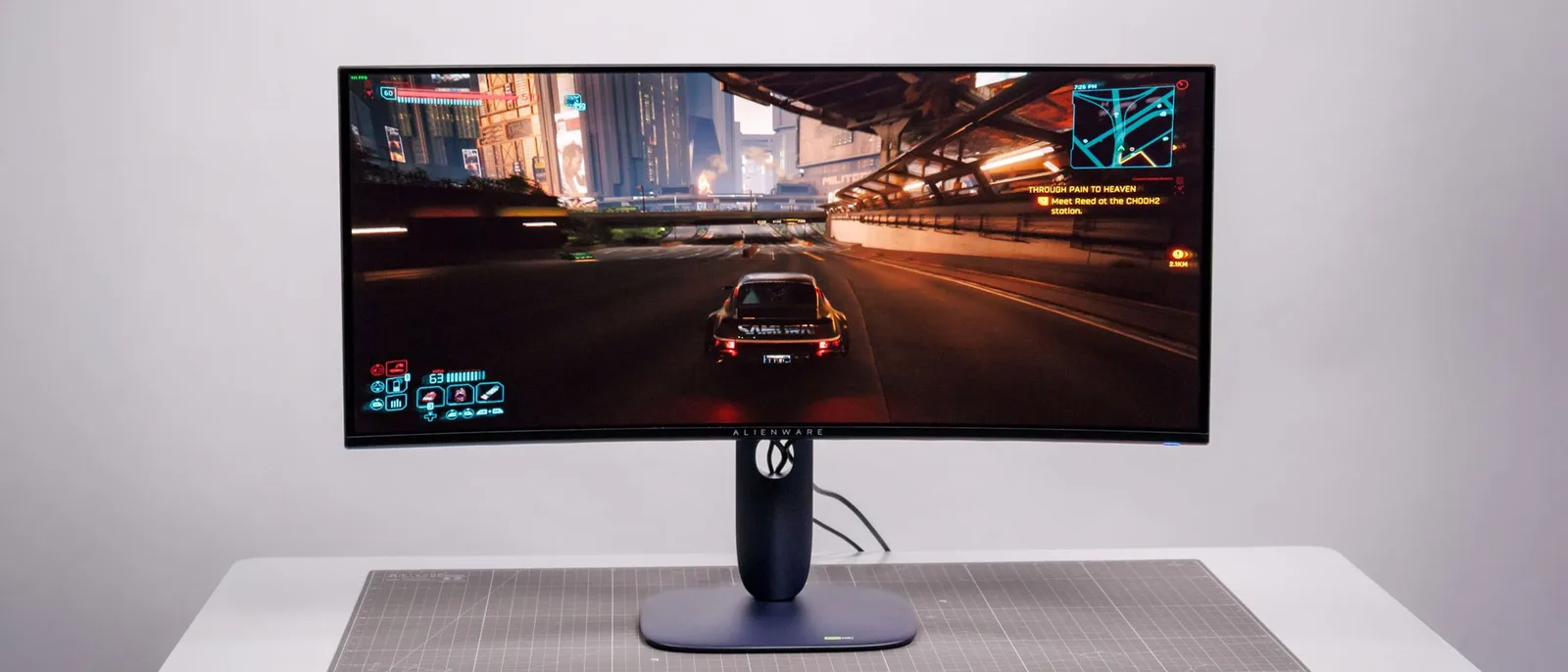
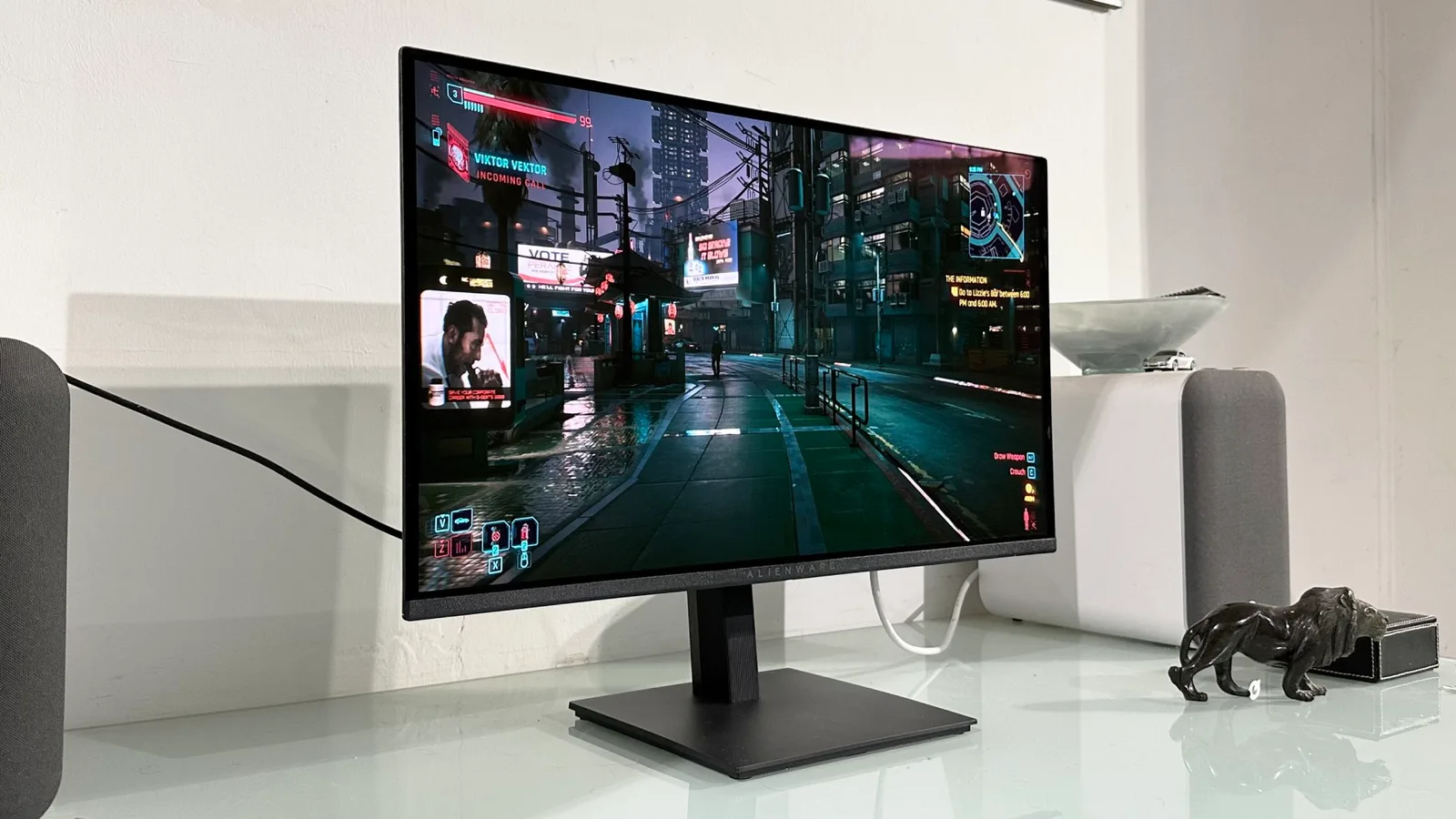
The Alienware 34 QD-OLED AW3423DWF is a monitor that has garnered widespread acclaim for its exceptional panel quality. The "DWF" designation distinguishes this model from the AW3423DW, though both questions about the difference between the two come down to a single fact the consensus data supports: the panel and image performance are the same class of hardware. What we found particularly impressive is its ability to cover over 107% of the DCI-P3 gamut, ensuring vibrant and accurate colors, paired with deep contrast that delivers perfect black levels and stunning SDR and HDR image quality. The 165Hz refresh rate, complemented by a 48-165Hz VRR range, makes it a solid choice for gaming enthusiasts looking for smooth visuals. The robust build quality, as noted by many reviewers, adds to its appeal. However, there are some trade-offs to consider. The lack of eARC support on HDMI ports and limited HDR brightness might be a letdown for those seeking the absolute best in audio and HDR performance. The stand's size and proximity to the wall could be a design issue for some users, and the absence of USB-C connectivity is noteworthy given the trend towards such ports.
Performance Breakdown
Expert Scores
How 14 professional publications rated this product
In-Depth Analysis
Color Accuracy 95
99.3% DCI-P3 coverage and Delta E below 2.0 out of the box. Eight sources agreed, zero dissent. This is the strongest consensus across any aspect of this monitor.
Key Takeaway
→Buy this without hesitation if color accuracy matters to your work. The factory calibration is legitimate, and you won't need a colorimeter to get accurate results.
Display Image Quality 92
20 sources, near-unanimous verdict: the QD-OLED panel is exceptional for dark-room gaming, but the triangular subpixel layout creates real text fringing that productivity users will notice daily.
Key Takeaway
→If you game in a dark room and want the best contrast and color available in an ultrawide, buy this. If you code, write, or work under bright lights, look elsewhere.
Gaming Performance 90
The 0.1ms response and near-zero motion blur are as good as it gets in a monitor right now. The 165Hz ceiling and HDMI 2.0 port are the only real performance complaints across 18 sources.
Key Takeaway
→PC gamers with a capable GPU get best-in-class motion clarity. Console gamers should stop reading here and look at something else.
Build & Design 89
The $200 price cut over the original is the headline. The trade-off is a plainer black plastic chassis with no light ring, but the core build quality held up across 21 sources.
Key Takeaway
→If you want QD-OLED ultrawide performance without paying the original's premium, the DWF is the smarter buy. If the Alienware aesthetic matters to you, the savings come with visible cosmetic cuts.
HDR & Brightness 80
Peak HDR hits 1000 nits in small highlights, but full-screen SDR sits around 250 nits, and that gap is the whole story with this panel.
Key Takeaway
→For dark-room HDR gaming and cinematic content this delivers, but update firmware M3B104 first and accept that full-screen brightness will never match a mini-LED competitor.
Ergonomics & Stand 79
The stand adjusts well and releases quickly for VESA mounting, but five sources agreed it's too large and sits too close for typical desk setups.
Key Takeaway
→The stand works, but budget for a monitor arm. Five sources flagged the footprint as a real desk-space problem, and the quick-release VESA mount makes switching easy.
Burn-In Protection 79
Alienware includes automatic pixel refresh and a 3-year burn-in warranty, but the risk is real and requires deliberate usage habits.
Key Takeaway
→The warranty and auto-protection features reduce burn-in risk meaningfully, but static UI elements and productivity use still require deliberate precautions.
Connectivity & Ports 74
No USB-C and no HDMI 2.1 are the two ports this monitor is missing, and five sources each flagged them as genuine omissions at this price.
Key Takeaway
→PC-first users with DisplayPort GPUs will be fine. Anyone expecting USB-C or full HDMI 2.1 console bandwidth should factor those absences into the buying decision.
Specifications & Verdict
Display
- Screen Size
- 34 in
- Resolution
- 3440 × 1440
- Panel Type
- Quantum Dot Organic Light-Emitting Diode (QD-OLED)
Performance
- Refresh Rate
- 165 Hz
- Response Time
- 0.1 ms
- Adaptive Sync
- AMD FreeSync Premium Pro, NVIDIA G-SYNC Compatible
Image
- Contrast Ratio
- 1,000,000:1
- Peak Brightness
- 1000 nits
- Color Gamut
- DCI-P3 ~99%
- Color Depth
- 10-bit
- HDR Support
- DisplayHDR TrueBlack 400
Connectivity
- Video Inputs
- 2x DisplayPort 1.4, 1x HDMI 2.0
- USB Ports
- 1x up, 4x down
- Audio Output
- 3.5mm headphone output
Design
- Weight
- 20.5 pounds (9.3kg)
- Dimensions
- 32.1 x 16.4-20.7 x 14.3 inches (815 x 417-527 x 240mm)
- Bezel Width
- Top/sides: 0.4 inch (9mm), Bottom: 0.7 inch (17mm)
- Panel Thickness
- 5 inches (127mm)
- VESA Mount
- VESA compatible (quick-release button)
- Stand Adjustments
- height, tilt, swivel
Other Specs
- Power Consumption
- 40.7w, brightness @ 200 nits
- Warranty
- 3 years
- Special Features
- AlienVision (Night Vision, Clear Vision, Chroma Vision, Crosshair), Alienware RGB lighting
- Stand Type
- V-shaped
Our Verdict
The Alienware 34 QD-OLED AW3423DWF earns its 91/100 score by delivering one of the best panels you can buy at $1,099. Perfect black levels, factory-calibrated color accuracy, and 165Hz gaming performance make it a clear pick for PC gamers and color-conscious creators. The trade-offs are real but narrow: SDR brightness caps around 240 nits, the stand eats desk space, and there's no USB-C. If those don't apply to your setup, buy it.
Customer Reviews Amazon
568 reviews
Beautiful screen, amazing colors, and honestly the perfect size.
Best monitor I've ever owned
Amazing picture quality, and amazing price!
Great picture
Show all 8 reviews
Great OLED at this price point! Though minor defects are likely, even with 2025 models
Great looking monitor, horrible customer service from Dell/Alienware.
Sharp colors and true blacks.
Great quality monitor
Reviews shown are from Amazon customers and do not reflect our editorial assessment.
Reader Questions
Specific questions about the Alienware 34 QD-OLED AW3423DWF, answered only from what reviewers reported.
01Are the blacks and contrast really as good as people say?
Reviewers consistently confirm the contrast is exceptional. The self-emissive QD-OLED pixels produce perfect black levels with infinite contrast and zero backlight bleed, and the monitor carries VESA True Black 400 certification.
02Is the screen bright enough for a well-lit room?
This is a real limitation. Typical SDR brightness sits around 250 nits, which is low compared to LED competitors, and the glossy coating can cause noticeable glare and raised black levels in bright environments.
03Does text look sharp, or does the OLED subpixel layout cause problems?
Text clarity is a known trade-off. The triangular subpixel layout produces pink-green fringing on small text edges, which some users will notice in everyday desktop use.
04Can I use this with a PS5 or Xbox Series X?
Yes, HDMI 2.1 enables 120Hz console gaming, and a dedicated Console Mode helps with PS5 and Xbox Series X compatibility. However, the HDMI ports are limited to 2.0 bandwidth for uncompressed high-refresh signals, which is a constraint worth knowing.
05Should I worry about burn-in with daily use?
Burn-in is a genuine long-term risk that reviewers flag, requiring sensible usage habits such as hiding static elements like the taskbar. There are also no user-customizable OLED care options available in the menu.
06Does the stand take up a lot of desk space?
Multiple reviewers flag the stand as a practical problem. The large V-shaped base consumes significant desk depth and positions the screen closer than many setups can comfortably accommodate.
Pricing & Availability
Updated Aug 4, 2026Alienware 34 QD-OLED AW3423DWF
All regions
Sources & Methodology
Every score is built on evidence. This review synthesizes 24 independent sources — expert publications, video reviews, and community discussions — weighted by credibility, depth, and relevance.
Show detailed source analysis ↓ Hide source analysis ↑
Expert Reviews
pcworld.com
Top
4.5/5-point
The Alienware AW3423DWF delivers exceptional image quality through its QD-OLED panel with excellent contrast, color gamut, and accuracy. At $1,099, it undercuts its predecessor by $200 while maintaining most features. The 165Hz refresh rate pairs with AMD FreeSync Premium Pro and VESA Adaptive Sync. Port selection includes two DisplayPort 1.4 and one HDMI 2.0, with four USB-A ports but no USB-C. The robust black design remains sturdy but retains an overly large stand that sits too close to the user. HDR performance is respectable though maximum brightness falls short. Menu navigation is intuitive via joystick control, and extensive calibration options suit creative professionals.
Strengths
- +Excellent contrast ratio from QD-OLED panel
- +Top-notch color gamut and accuracy
- +Great motion clarity for gaming
- +Respectable HDR performance
Weaknesses
- −Stand is too large and sits too close
- −No USB-C connectivity included
- −Maximum HDR brightness is lackluster
- −Only available in black colorway
techspot.com
Top
90/100-point
The AW3423DWF delivers nearly identical QD-OLED performance to its pricier sibling at $200 less. Swapping the G-Sync module for a traditional scaler brings welcome improvements: quieter, more consistent active cooling that fully shuts off in standby, user-upgradeable firmware addressing early adopter issues, and a stealthier all-black design with different RGB placement. The 165Hz refresh rate (vs. 175Hz) proves imperceptible in practice, and adaptive sync works across both AMD and Nvidia GPUs despite the FreeSync branding. Port selection remains dated with only DisplayPort 1.4 and HDMI 2.0, lacking USB-C and newer standards. Build quality stays premium with sturdy height, tilt, and swivel adjustments.
Strengths
- +$200 cheaper with nearly identical performance
- +Much quieter, more consistent active cooling
- +Fan fully switches off in standby mode
- +User-upgradeable firmware
Weaknesses
- −No DSC on DisplayPort 1.4 limits bandwidth
- −8-bit color at 165Hz, 10-bit only at lower refresh
- −HDMI 2.0 instead of 2.1
- −No USB-C connectivity
windowscentral.com
Top
4.5/5-point
The Alienware 34 QD-OLED AW3423DWF delivers exceptional picture quality and color accuracy through its Quantum Dot OLED panel. Setup proves straightforward with sustainable packaging, intuitive assembly, and thoughtful cable management features including a snap-on rear cover. The sturdy stand includes height, swivel, and tilt adjustments, though its length consumes considerable desk space. Gaming performance impresses with 165Hz refresh rate and AMD FreeSync Premium Pro support. However, brightness levels remain modest for general use, and the Alienware Command Center software detracts from the overall experience. At $1,099.99, it positions itself as relatively competitive pricing for a curved OLED widescreen display.
Strengths
- +Class-leading color accuracy out of the box
- +Fantastic picture quality with vivid OLED contrast
- +Stellar 165Hz gaming performance
- +Practical cable management with rear cover panel
Weaknesses
- −Alienware Command Center software degrades experience
- −Not very bright in general everyday use
- −Deeply recessed ports frustrate initial connection
- −Stand is overly long for typical desk setups
gamesradar.com
Top
4.5/5-point
This monitor delivers exceptional PC gaming performance through its QD-OLED panel technology. The glossy coating enhances perceived contrast and HDR impact compared to the matte original. Pixel response is effectively blur-free, outperforming even the fastest LCD alternatives. At $1,099, it costs $200 less than its predecessor by dropping Nvidia G-Sync Ultimate for AMD FreeSync Premium Pro. The 165Hz refresh rate (down from 175Hz) is imperceptible in practice. However, the 3440x1440 resolution limits appeal for productivity work and console gaming due to the 21:9 ultrawide format. Build quality shifts from white to black plastics, losing some visual distinction. Missing USB-C also reduces versatility for non-gaming use cases.
Strengths
- +Glossy coating enhances contrast and lets QD-OLED panel perform better
- +Effectively blur-free pixel response beats any LCD monitor
- +Perfect per-pixel HDR lighting without local dimming limitations
- +Costs $200 less than original while keeping core performance
Weaknesses
- −3440x1440 resolution poorly suited for general computing work
- −21:9 ultrawide format problematic for pure console gaming
- −Non-standard subpixel structure may cause text rendering issues
- −No USB-C connectivity limits multi-purpose appeal
ign.com
Top
9/10-point
The AW3423DWF delivers exceptional QD-OLED picture quality with deep blacks, vibrant colors, and outstanding HDR performance. Its 3440x1440 resolution at 165Hz with 0.1ms response time makes it highly responsive for gaming. The monitor comes factory calibrated with 99.3% DCI-P3 coverage, suitable for creative work. At $1,099, it costs $200 less than its predecessor by dropping G-Sync Ultimate. Self-emissive pixels enable perfect black levels but result in lower typical brightness (250 nits) and higher power consumption. Alienware includes burn-in prevention features like pixel refreshers and shifters. The design features a modest 1800R curve, Dark Side of the Moon finish, height adjustment, tilt, and VESA mounting.
Strengths
- +Stunning QD-OLED picture with exceptional colors and luminance
- +0.1ms gray-to-gray response time outperforms TN, VA, and IPS panels
- +VESA True Black 400 certified with deep, inky blacks
- +Factory calibrated with 99.3% DCI-P3 and 149% sRGB coverage
Weaknesses
- −Typical brightness of only 250 nits in normal use
- −Significantly less bright than LED panel competitors
- −High power consumption from self-emissive pixel design
- −No portrait mode orientation available
pcgamer.com
Top
95/100-point
The glossy anti-glare coating transforms this second-generation QD-OLED ultrawide into what the reviewer considers the best HDR gaming experience currently available. Samsung's panel technology avoids aggressive brightness limiting found in competing LG OLED displays, maintaining consistent punchy output across varied content. At 165Hz with 0.1ms response time, motion clarity is exceptional despite the slight refresh rate reduction from the original model. The coating strikes an effective balance—boosting contrast and black levels without becoming distractingly reflective. Cost savings from dropping Nvidia G-Sync Ultimate certification for AMD FreeSync Premium Pro make this revised model several hundred dollars cheaper while delivering nearly identical real-world performance.
Strengths
- +Glossy anti-glare coating dramatically improves contrast and black levels
- +Samsung QD-OLED avoids aggressive full-screen brightness dimming
- +Exceptional pixel response with zero motion blur
- +Significantly cheaper than original model with minimal feature loss
Weaknesses
- −Still fairly pricey at $1,099
- −Mediocre pixel density at 3440 x 1440 on 34 inches
- −10Hz refresh rate reduction from original model
- −Lower full-screen brightness than mini-LED alternatives
rtings.com
Top
8.9/10-point
This 34-inch ultrawide QD-OLED monitor targets PC gamers seeking outstanding picture quality in dark environments. The QD-OLED panel combines OLED's perfect black levels with quantum dot color range, though black levels degrade in bright rooms due to the missing polarizing layer. Native FreeSync Premium Pro and a dedicated Console Mode enable 4K @ 60Hz downscaling for PS5 and Xbox Series X compatibility. Picture-in-Picture and Picture-by-Picture modes add multitasking flexibility. The 165Hz refresh rate falls below some competitors, and HDR brightness lags behind the G-SYNC variant. A larger USB hub and audio ports distinguish it from newer Alienware models. Overall performance remains excellent for users prioritizing value over cutting-edge specifications.
Strengths
- +Outstanding picture quality in dark rooms
- +Better HDR performance than most monitors
- +Native FreeSync Premium Pro support
- +Console Mode downscales 4K @ 60Hz signals
Weaknesses
- −Black levels rise in bright rooms
- −Lacks polarizing layer like first-gen QD-OLEDs
- −Doesn't get as bright in HDR as AW3423DW
- −Lower 165Hz refresh rate versus competitors
stuff.tv
Top
5/5-point
This premium QD-OLED gaming monitor delivers exceptional color performance with 99.3% DCI-P3 coverage and vibrant quantum dot-enhanced visuals. The 3440×1440 curved panel runs at 165Hz with AMD FreeSync Premium Pro, targeting high-end gamers with beefy PCs. Its understated design avoids aggressive gaming aesthetics, featuring a sturdy tripod stand with tilt and rotation adjustments. The monitor includes practical gaming aids like Night Vision, Clear Vision, Chroma Vision heatmaps, and a custom crosshair overlay that notably improved performance in FPS titles. Connectivity is comprehensive with HDMI, dual DisplayPort 1.4, multiple USB 3.2 Gen 1 ports, and front-accessible audio jacks. Heat management works effectively through 360° ventilation. However, the joystick-based menu navigation proves fiddly, and the premium pricing approaches big-screen TV territory.
Strengths
- +Exceptional color vibrance from quantum dot OLED technology
- +99.3% DCI-P3 coverage suits creative professionals
- +Understated design avoids overly aggressive gaming aesthetics
- +Sturdy stand with firm tilt and rotation adjustments
Weaknesses
- −Premium pricing nearly matches big-screen TV costs
- −Fiddly joystick controls for onscreen menu navigation
- −Curved panel requires more desk space than flat alternatives
- −3440×1440 resolution still demands powerful graphics hardware
displayninja.com
Top
4.8/5-point
The AW3423DWF delivers exceptional image quality through its QD-OLED panel with flawless 178° viewing angles, factory calibration with Delta E < 2, and wide color gamut coverage (99.3% DCI-P3, ~95% Adobe RGB). Brightness reaches 250-nits for full-screen white, ~550-nits for 10% windows, and around 1000-nits for small highlights, enabling vivid HDR performance with two available modes. The 3440×1440 resolution on 34″ yields 110 PPI for sharp text without scaling, while infinite contrast produces true blacks without backlight bleed or blooming. Gaming performance includes 165Hz refresh rate with 48-165Hz VRR range and FreeSync Premium Pro. However, the triangular subpixel layout causes visible color fringing on small text, and OLED burn-in risk requires sensible use of built-in prevention features.
Strengths
- +Identical image quality to pricier AW3423DW at $150 less
- +Factory calibrated with Delta E < 2 accuracy
- +99.3% DCI-P3 and ~95% Adobe RGB coverage
- +250-nits full-screen, ~1000-nits peak brightness
Weaknesses
- −Triangular subpixel layout causes green/reddish fringing on tiny text
- −No official NVIDIA G-SYNC Compatible certification
- −Some unsupported games show black bars at sides
- −HDR Peak 1000 can trigger ABL in some scenes
guidespot.com
Top
4.1/5-point
After three months of use, the reviewer found this monitor represents a fundamental shift in display technology, combining Samsung's second-generation QD-OLED panel with gaming-focused engineering. The 0.1ms response time delivers instantaneous pixel transitions with zero ghosting or smearing. Out-of-box color accuracy achieves Delta E below 2.0 across sRGB, with 99.3% DCI-P3 coverage validated by colorimeter testing. The infinite contrast ratio produces genuine black levels without IPS glow or backlight bleed. However, quality control issues with packaging, a glossy screen prone to reflections and scratches, QD-OLED text fringing, and mandatory 4-hour pixel refresh cycles present notable drawbacks. Dell's strategic cost-cutting actually benefits most gamers while maintaining core OLED advantages.
Strengths
- +0.1ms response time with zero ghosting or smearing
- +Delta E below 2.0 color accuracy out of box
- +99.3% DCI-P3 coverage, validated by reviewer
- +Infinite contrast with genuine black levels
Weaknesses
- −Quality control issues with packaging
- −Glossy screen coating prone to scratches
- −Text fringing from QD-OLED subpixel layout
- −Mandatory pixel refresh every 4 hours
tomshardware.com
Top
5/5-point
QD-OLED technology elevates this 34-inch curved ultra-wide well beyond typical LCD panels. The 1800R curvature balances immersion with zero image distortion, while 165 Hz refresh rate with Adaptive-Sync support delivers exceptionally smooth motion. Factory-certified color accuracy eliminates any need for calibration, and the monitor covers over 107% of DCI-P3 with true 10-bit color depth. HDR performance peaks at 1,000 nits for small highlights, combining with OLED's inherent perfect blacks for outstanding dynamic range. A dedicated Creator mode toggles between DCI-P3 and sRGB gamuts. Practical observation showed motion clarity visually comparable to 240 Hz LCD displays despite the lower refresh rate. Premium build quality and sustainable packaging round out a thoughtfully designed package.
Strengths
- +Stunning SDR and HDR image quality
- +Deep contrast with perfect black levels
- +Covers over 107% of DCI-P3 gamut
- +Visually smoother than 165 Hz LCD panels
tomsguide.com
Top
4.5/5-point
The Alienware AW3423DWF QD-OLED delivers excellent image quality through its 3440 x 1440 Quantum Dot OLED panel with 165Hz refresh rate. At $1,099, it costs $200 less than its predecessor while adding HDMI 2.1 for 120Hz console gaming. The design is thinner and lighter at 21 pounds with stand, featuring an all-black chassis with 1800R curvature. Six preset picture modes optimize different gaming genres. The stand offers 4.3 inches height adjustment, -5 to 21 degree tilt, and 20 degree swivel. Connectivity includes two DisplayPorts, one HDMI 2.1, four USB-A ports, and audio outputs. Color coverage reaches 180% sRGB and 127% DCI-P3 in Standard mode.
Strengths
- +Excellent image quality with vibrant QD-OLED colors
- +$200 cheaper than previous model
- +Thinner and lighter design for easier mounting
- +Fast 165Hz refresh rate with low latency
Weaknesses
- −Minor update over previous model
- −Large V-shaped stand consumes desk space
- −Still heavy at 21 pounds with stand
- −Limited 120Hz console game selection currently
pcmag.com
4.5/5-point
The Alienware 34 QD-OLED AW3423DWF earns an Editors' Choice pick with a higher rating than its predecessor due to its lower $1,099 price point. This 34-inch curved ultrawide monitor features a 1800R curvature, Quantum Dot OLED panel with 99.3% DCI-P3 coverage, factory calibration with Delta E less than 2, and peak brightness of 1,000 nits. The refresh swaps Nvidia G-Sync Ultimate for AMD FreeSync Premium Pro with a slight reduction in refresh rate. Design elements include ultrathin bezels, sturdy V-shaped stand with cable management, Alienware RGB lighting, and quick-release VESA mounting. The I/O hub includes two DisplayPort connectors, one HDMI port (no HDMI 2.1), multiple USB-A ports, USB-B, and a headphone jack. The monitor weighs approximately 32 pounds, about 3 pounds lighter than the previous model, and includes Alienvision gaming features like Night Vision and Crosshair overlays.
Strengths
- +Lower $1,099 price than predecessor with similar performance
- +Quantum Dot OLED delivers superior color and higher peak luminance
- +99.3% DCI-P3 cinema-grade color coverage
- +Factory calibrated with Delta E less than 2
Weaknesses
- −No HDMI 2.1 port limits console high frame rates
- −Slight reduction in refresh rate from predecessor
- −Few console games utilize higher refresh rates anyway
thetechhacker.com
The AW3423DWF delivers a premium QD-OLED ultrawide experience with exceptional contrast, vivid color, and crisp motion at a more accessible price point than its G-SYNC-equipped sibling. Samsung's panel technology enables perfect blacks and near-instant response times, while the darker Legend 2.0 design offers sturdy build quality with practical ergonomics. Console compatibility via downscaling modes adds versatility, though HDMI 2.0 bandwidth limits and ultrawide pillarboxing constrain that use case. Recent price reductions have strengthened its value proposition significantly.
Strengths
- +Perfect blacks with infinite contrast from self-emissive QD-OLED pixels
- +Near-instant response eliminates LCD ghosting and smearing artifacts
- +Strong factory calibration with Delta E under 2 on many units
- +Console Mode enables 4K downscaling for PS5 and Xbox compatibility
Weaknesses
- −Large stand footprint consumes significant desk depth
- −Faint fan or coil whine audible in ultra-quiet rooms
- −HDMI 2.0 limited to 100 Hz at native resolution
- −Raised blacks visible in bright rooms without polarizer
wired.com
10/10-point
This 34-inch ultrawide QD-OLED monitor delivers exceptional gaming and movie experiences with vivid colors, perfect black levels, and lightning-fast 0.1ms response times. The 3,440 x 1,440 resolution pairs well with mid-range gaming PCs, while the 175-Hz refresh rate (via DisplayPort) ensures smooth gameplay. HDR Peak 1000 mode reaches 1,000 nits but struggles with bright content; HDR 400 True Black mode proves more versatile. Build quality is excellent with sci-fi aesthetics that can be disabled. However, the monitor falls short for productivity use, lacks USB-C connectivity, and requires DisplayPort for full performance—HDMI ports are limited to 100 Hz. The sturdy stand consumes considerable desk space, though VESA mounting is supported.
Strengths
- +Stunning image quality with vivid, accurate colors
- +Perfect black levels from self-emitting pixels
- +0.1-millisecond response time eliminates ghosting
- +175-Hz refresh rate via DisplayPort
Weaknesses
- −Too much white on screen causes brightness issues
- −Direct light exposure creates visibility problems
- −Fan noise during operation
- −Some content lacks 21:9 aspect ratio support
jamm21.com
The AW3423DWF delivers outstanding image quality through quantum dot-OLED technology with a 34-inch 1800R curved WQHD display at 3440 x 1440 resolution. It achieves 165Hz refresh rate with 0.1ms gray-to-gray response times for smooth, responsive gameplay. The monitor reaches 1000-nit peak brightness with DisplayHDR 400 True Black certification and covers 99.3% of DCI-P3 color space, factory-calibrated to Delta E less than 2. Native AMD FreeSync Premium Pro support eliminates tearing and stuttering. A dedicated Console Mode improves compatibility with PS5 and Xbox Series X through DisplayPort signal downscaling. The Dark Side of the Moon colorway features AlienFX lighting on the logo and rear panel, plus improved cable management, 360° ventilation, and a centralized OSD joystick.
Strengths
- +Quantum dot-OLED delivers outstanding image quality and dynamic color
- +1000-nit peak brightness with DisplayHDR 400 True Black certification
- +99.3% DCI-P3 coverage factory-calibrated to Delta E under 2
- +0.1ms gray-to-gray response time for near-instant color switching
Weaknesses
- −165Hz refresh rate lower than 175Hz sibling model
- −Lacks native NVIDIA G-SYNC hardware module support
- −Dark Side of the Moon only color option available
- −Requires AMD graphics card for optimal adaptive sync performance
Video Reviews
 Too Much Tech
The AW3423DWF is a curved 34-inch QD-OLED ultrawide monitor at …
Too Much Tech
The AW3423DWF is a curved 34-inch QD-OLED ultrawide monitor at …
The AW3423DWF is a curved 34-inch QD-OLED ultrawide monitor at 3440x1440 resolution with 165Hz refresh rate and AMD FreeSync Premium Pro. It features a glossy display, RGB lighting zones, four USB 3.2 Gen 1 ports, two DisplayPort 1.4 ports, and one HDMI 2.0 port. Color reproduction is very good with identical DCI-P3 coverage to the DW variant, though slightly lower Adobe RGB performance. Motion blur performance is exceptional with virtually no smearing, delivering clarity comparable to 240Hz LCD monitors despite the lower refresh rate. The monitor supports firmware updates and includes a three-year warranty covering burn-in. The reviewer considers it the better value option over the more expensive DW variant, sacrificing only 10Hz and one HDMI port for significant savings.
- →Best value QD-OLED ultrawide for budget-conscious gamers
- →Enable FreeSync Premium Pro when running below 165 FPS
- →Ideal for immersive AAA gaming with maxed graphics
- →Lower settings slightly to avoid needing adaptive sync
- →Excellent choice for competitive play prioritizing clarity over raw Hz
 Monitors Unboxed
The AW3423DWF has remained a solid option since launch due to strong …
Monitors Unboxed
The AW3423DWF has remained a solid option since launch due to strong …
The AW3423DWF has remained a solid option since launch due to strong performance at competitive pricing, often available around $700-800. It uses a 34-inch 3440x1440 QD OLED panel with a 165Hz refresh rate and 1800R curve. The monitor features first-generation Samsung Display QD OLED technology with the original triangle RGB sub-pixel layout. Text clarity is comparable to other 34-inch QD OLED panels but ranks lower than newer OLED implementations due to lacking sub-pixel upgrades found in 27-inch 1440p and latest 4K models. Pink-green fringing can appear along text edges. The design includes Alienware's older industrial styling rather than the newer 2025 AW30 design.
- →Budget-friendly entry into QD OLED ultrawide gaming
- →Accept text clarity tradeoffs for price savings
- →Wait for sales below $800 for best value
- →Consider newer models if text work is primary use
- →Burn-in protection runs automatically without user control
 Monitors Unboxed
Firmware M3B104 (released June 5th) brings meaningful improvements to …
Monitors Unboxed
Firmware M3B104 (released June 5th) brings meaningful improvements to …
Firmware M3B104 (released June 5th) brings meaningful improvements to the AW3423DWF's HDR1000 mode, finally resolving long-standing accuracy issues. Previously, the 1000 nit mode suffered from raised brightness across the entire EOTF range despite achieving proper peak brightness. The new firmware enables accurate EOTF tracking without requiring previous setting tweaks like contrast reduction or source tone mapping. Mode switching now behaves correctly with a brief black screen and updated HDR metadata rather than an instant transition. NVIDIA GPU owners see the most dramatic improvement, achieving results rivaling top QD-OLED competitors. Fan noise receives minor improvements though was already acceptable. AMD GPU performance requires separate verification.
- →Apply firmware M3B104 immediately for HDR fixes
- →NVIDIA users finally get hassle-free accurate HDR
- →Remove previous contrast and tone mapping tweaks
- →Console mode on with defaults now optimal
- →Verify AMD GPU behavior separately before purchase
 Just!N Tech
The reviewer unboxes and evaluates Alienware's 34-inch QD-OLED …
Just!N Tech
The reviewer unboxes and evaluates Alienware's 34-inch QD-OLED …
The reviewer unboxes and evaluates Alienware's 34-inch QD-OLED ultrawide gaming monitor, praising its sci-fi inspired design with soft curves and chiseled accents, though noting only one color option is available. The glossy finish produces undesirable glare in bright environments due to the curve. The monitor runs cool thanks to generous ventilation throughout the back plate and arm. Setup proves straightforward with tool-free assembly, and the included magnetic cable cover effectively manages cable routing. The stand offers limited pivot (5 degrees each direction) but generous swivel (45 degrees), height adjustment (110mm), and tilt range (21 to -5 degrees). At 20 pounds total (13.8 without stand), it works with most third-party monitor arms. The OSD includes gaming-focused Alien Vision modes: night vision, clarity enhancement, chroma heat maps, and a crosshair overlay—though the reviewer warns against leaving static elements on screen due to OLED burn-in risk.
- →Best suited for controlled lighting environments due to glare
- →Ideal for gamers prioritizing aesthetic design and RGB
- →Pair with third-party monitor arm for better value
- →Use Alien Vision modes selectively to prevent burn-in
- →Strong thermal performance enables sustained gaming sessions
 FIRE WOLF TECH
The reviewer unboxes and sets up the AW3423DWF, highlighting its 165Hz …
FIRE WOLF TECH
The reviewer unboxes and sets up the AW3423DWF, highlighting its 165Hz …
The reviewer unboxes and sets up the AW3423DWF, highlighting its 165Hz refresh rate, 1800R curvature, and remarkably lightweight design. Factory calibration report is included. The dark gray color scheme receives praise, though the plastic body feels less premium than expected. Stand installation requires no tools thanks to a wing screw design. Height adjustability reaches 4.3 inches with tilt (-5° to 21°) and swivel (±20°). The built-in power supply eliminates external brick clutter. Port selection includes dual DisplayPorts, HDMI 2.0, and multiple USB 3.2 connections. VESA mounting via 100×100 adapter is supported.
- →Ideal for gamers wanting deep OLED blacks
- →Easy setup suits users avoiding tools
- →Lightweight design simplifies VESA mounting
- →Ultra-wide format fits immersive gaming setups
- →Factory calibration appeals to color-sensitive work
 RTINGS Home Theater
The AW3423DWF is a 34-inch curved ultrawide QD-OLED monitor with 1440p …
RTINGS Home Theater
The AW3423DWF is a 34-inch curved ultrawide QD-OLED monitor with 1440p …
The AW3423DWF is a 34-inch curved ultrawide QD-OLED monitor with 1440p resolution, featuring a black body design and no cooling fan noise. Its QD-OLED panel delivers perfect blacks in dark rooms, vivid colors, and bright highlights, making it ideal for movie watching and dark-room gaming. However, bright room performance suffers from raised black levels that appear purple, and SDR peak brightness struggles against heavy glare. HDR brightness is limited compared to expectations, with specific setting requirements for NVIDIA cards in HDR Peak 1000 mode. The triangular RGB subpixel layout also affects text clarity for productivity use.
- →Best suited for dark room gaming and movie watching
- →Avoid placement opposite bright windows
- →AMD graphics cards have simpler HDR setup
- →Not ideal for text-heavy productivity work
- →Disable HDR for desktop use to avoid flickering
Community Discussions via Reddit
Setup Showcase
r/ultrawidemasterrace
u/EmperorRosko
The Alienware 34 QD-OLED AW3423DWF receives strong praise from owners for its vibrant QD-OLED colors, deep blacks, and immersive 21:9 ultrawide format. Users describe the 3440x1440 resolution as offering an ideal balance of performance and sharpness, with one owner calling it 'a 27" with wings' due to equivalent pixel density. The monitor excels at filling peripheral vision during gaming. Packaging quality is noted as excellent with protective polystyrene. The 'F' variant specifically drops the NVIDIA G-Sync Ultimate module for considerable cost savings while maintaining identical panel quality. Multiple owners express they would not return to 16:9 or non-OLED displays after adoption.
Key Insights
- →Best for gamers prioritizing color vibrancy and contrast over maximum resolution
- →Ideal for systems where 4K ultra settings would strain performance
- →Strong owner satisfaction with format switch from 16:9 to 21:9 ultrawide
- →DWF variant represents recommended value choice over DW for most users
- →Considered endgame display for OLED color quality at ultrawide format
Top Comments
I have the AW3423DW and holy cow wow the vibrant colors and deep blacks are on another level of amazing. I tried the LG C2 42, but the colors were kind of drab. And I much prefer 21:9 over 16:9. …
To me 1440p is a perfect performance/sharpness ratio for a 27” 16:9 and I think many would agree and this isn’t “bigger” than a 27, it’s just wider. So the pixel density remains the same. It’s a 27” …
To me 1440p is a perfect performance/sharpness ratio for a 27” 16:9 and I think many would agree and this isn’t “bigger” than a 27, it’s just wider. So the pixel density remains the same. It’s a 27” …
Troubleshooting
r/Monitors
u/dirthurts
The Alienware AW3423DWF is receiving a firmware update expected mid-February to address a tone mapping bug that causes washed-out colors in HDR, particularly affecting certain games like Deep Rock Galactic. Users have been working around this issue by using console mode. The monitor is otherwise regarded as "nearly perfect" by the OP. Community discussion reveals frustration that firmware updates are necessary at all, with some users receiving replacement units due to firmware issues—one commenter notably received a free second monitor when Dell failed to collect the defective unit. The tone mapping problem appears to be a known, persistent issue since launch that Alienware is now addressing after customer feedback.
Key Insights
- →Best for users willing to apply firmware updates and work around initial HDR tone mapping issues; mid-February firmware update expected to resolve primary complaint
- →Not ideal for users expecting flawless HDR out-of-box in all games, particularly titles with problematic tone mapping like Deep Rock Galactic
- →Community consensus: monitor hardware is excellent but launch firmware was inadequate; updatable firmware is preferable to non-updatable alternatives
- →Potential for exceptional customer service outcomes—some users report receiving free replacement units without return requirements
- →HDR gaming experience varies significantly by title implementation; monitor performance depends heavily on game-specific HDR support
Top Comments
Not sure on what you base this point when the DW does not have the issue to begin with. The firmware being updatable is nice and all, but it should not be necessary. You only need to update the …
As someone in that boat, I am absolutely thrilled that Dell messed up their firmware. They shipped me a new monitor but didn't ask for the old one back, so now I have two monitors for the price of …
https://www.dell.com/support/kbdoc/de-de/000207382/washed-out-color-when-using-hdr-with-the-aw3423dwf-alienware-gaming-monitor?lang=en So ETA is mid february
Scores based on weighted analysis of 24 expert and community sources. How we review →