

Corsair K70 RGB MK.2
Best For
- Gamers needing a durable keyboard
- Players who value switch variety
- Users with large hands appreciating a big wrist rest
Consider Carefully
- Budget-conscious shoppers
- Those seeking a simple software interface
Jump to Section
The Bottom Line
When it comes to gaming keyboards, the Corsair K70 RGB MK.2 delivers a robust and refined experience. It's a keyboard that's highly regarded by experts and gamers alike, offering a typing feel that's both responsive and satisfying. What we found most impressive is the range of Cherry MX switches it offers, accommodating every gamer's preference. This keyboards' build quality is also noteworthy, with a durable aluminum chassis that feels premium and rigid, as noted by IGN and Tom's Guide. The dedicated media keys and a satisfying metal volume wheel add to its appeal. However, there are a few trade-offs. The price point sits on the higher side, which might deter budget-conscious buyers, and the CUE software, while powerful, has a steep learning curve according to some sources.
Performance Breakdown
Expert Scores
How 5 professional publications rated this product
In-Depth Analysis
Switch Options 94
Five genuine Cherry MX options, including Speed and Silent variants, make this one of the more flexible switch lineups at this price point. Sixteen sources, no meaningful dissent.
Key Takeaway
→Pick your switch before you buy. The variety is real and meaningful. Speed for competitive play, Silent for shared spaces, Brown if you type as much as you game.
Media Controls 93
Eight of 10 sources praised the dedicated metal volume wheel and media keys. This is one of the least contested aspects of the keyboard.
Key Takeaway
→If you use media controls daily, this is one of the better implementations at this price. The metal wheel alone justifies the feature for most buyers.
Onboard Memory 92
8MB onboard storage for three profiles earns strong consensus across seven sources. LAN portability is the clear use case, and it delivers.
Key Takeaway
→If you attend LAN events or use multiple PCs, the onboard memory is a real convenience. For single-PC home setups, it's a nice backup but not a deciding factor.
RGB Lighting 90
Per-key RGB with 16 million colors and onboard ARM processor control earns a 90/100 across 13 sources, with almost no dissent on lighting quality.
Key Takeaway
→If per-key RGB quality matters and you're willing to spend time in iCUE, this delivers. If you want plug-and-play lighting without software overhead, temper expectations.
Build Quality 88
The aluminum frame earns near-universal praise across 16 sources, but the $170 price and missing macro keys are real friction points for specific buyers.
Key Takeaway
→If premium build quality and clean cable management matter more than macro keys or wireless, this is a safe buy. If you need either of those, look at the K95 or a competing board.
Keycap Quality 88
Bundled FPS and MOBA textured keycap sets get consistent praise from four sources, but ABS plastic and fingerprint visibility are legitimate long-term concerns.
Key Takeaway
→The included keycap variety is a genuine perk for FPS and MOBA players. If you type heavily and hate fingerprints, budget for a PBT aftermarket set down the line.
Wrist Rest 84
The included wrist rest divides reviewers. Bit-tech.net specifically called the texture irritating, while others found it comfortable for long sessions.
Key Takeaway
→The wrist rest is a bonus, not a selling point. If texture sensitivity is a concern, plan to replace it. If you just need something included, it works.
Software Experience 79
iCUE is powerful but earns the lowest aspect score at 79/100. Multiple sources flag the learning curve as a genuine barrier, not just a minor inconvenience.
Key Takeaway
→If you're already in the Corsair ecosystem or willing to learn iCUE, the depth is there. If you want to plug in and go, the software will frustrate you.
Specifications & Verdict
Design
- Form Factor
- full-size
- Size
- 104-key
- Dimensions
- 17.64 x 6.02 x 1.39 inches
- Weight
- 2.06 pounds
- Front Height
- 11.9mm
- Color Options
- 16+ million colors
Build
- Case Material
- aluminum
- Frame Material
- aircraft-grade anodized brushed aluminum
- Keycap Material
- ABS plastic
Switches
- Switch Type
- Cherry MX (Speed, Red, Brown, Silent, Blue options)
- Switch Options
- Cherry Red, Blue, Brown, Silent, Speed Silver
- N-Key Rollover
- true
- Actuation Distance
- 1.2 mm
Connectivity
- Wired
- Wired with detachable cable
- Cable
- Braided USB 3.0 to USB 3 Type-A
- USB Passthrough
- true
Features
- Media & Controls
- six dedicated
- Palm Rest
- detachable full-length soft touch
- Included Accessories
- MOBA and FPS
- Onboard Storage
- 3
- Special Features
- Windows Key Lock mode, Dedicated WIN Lock, mechanical software lockout, magnetic wrist rest
Other Specs
- Backlighting
- per-key RGB
- Software
- iCUE
- Usb Inputs
- two USB-A
Our Verdict
The Corsair K70 RGB MK.2 is a solid choice for gamers wanting a high-quality, customizable keyboard. Its combination of durability, switch options, and media controls make it a top pick. However, if you're on a tight budget or prefer intuitive, straightforward software, this might not be the keyboard for you.
Customer Reviews Amazon
523 reviews
Great Keyboard!
Best value in class
Not Good
good keyboard
Show all 10 reviews
La rapidez de todo el proceso
Very nice mech keyboard.
Great keyboard!
Continuously double strokes.
Excelente teclado
Alles gucci.
Reviews shown are from Amazon customers and do not reflect our editorial assessment.
Reader Questions
Specific questions about the Corsair K70 RGB MK.2, answered only from what reviewers reported.
01Does it come with a wrist rest, and is it comfortable for long sessions?
Yes, a detachable rubberized wrist rest is included, and reviewers found it comfortable for extended sessions. It is sized to fit big hands well.
02Does it have dedicated media controls, or do I have to use function-key shortcuts?
It has fully discrete media keys plus a metal volume wheel, so no function-key shortcuts are needed. Reviewers highlighted these as easy to locate and convenient for on-the-fly adjustments.
03Is the build quality solid enough to justify the price?
Reviewers consistently praised the aircraft-grade anodized brushed aluminum frame as premium and durable, with a pleasant weight that reinforces the quality feel. The construction is a clear highlight across multiple sources.
04Does it have a USB pass-through port?
Yes, there is a USB pass-through port for connecting other devices directly from the keyboard. Note that powering the keyboard requires two USB ports from your PC.
05How many switch options are available, and which types can I choose from?
There are five Cherry MX switch options: Red, Blue, Brown, Speed, and Silent, so most gamer preferences are covered. Reviewers confirmed these are authentic Cherry MX switches with no corner-cutting.
06Is the companion software easy to use?
Reviewers flagged that the CUE software has a steep learning curve and an interface that could be more intuitively laid out, so expect some time investment to get the most out of it.
Pricing & Availability
Updated Mar 13, 2026Corsair K70 RGB MK.2
Sources & Methodology
Every score is built on evidence. This review synthesizes 18 independent sources — expert publications, video reviews, and community discussions — weighted by credibility, depth, and relevance.
Show detailed source analysis ↓ Hide source analysis ↑
Expert Reviews
tomsguide.com
5/5-point
The Corsair K70 RGB Mk.2 represents a refined evolution of its predecessor, featuring a compact 17 x 6 inch aluminum chassis that balances gaming aesthetics with professional appeal. Five Cherry MX switch options (Speed, Red, Brown, Silent, and Blue) distinguish it from competitors typically offering only one or two variants. The keyboard includes discrete media controls with a volume wheel, USB pass-through, textured FPS/MOBA key caps, and extensive RGB customization through Corsair Utility Engine software. At $180, it commands a premium price justified by durable construction and authentic mechanical switches. Typing performance reached 116 WPM with Cherry MX Blues. The software presents a learning curve but enables sophisticated lighting effects, game profiles, and macro recording.
Strengths
- +Aluminum chassis provides durability and refined appearance
- +Five Cherry MX switch options cover all gamer preferences
- +Compact 17-inch design without wasted space
- +Full discrete media controls with volume wheel
Weaknesses
- −$180 price point excludes budget-conscious buyers
- −CUE software has steep learning curve
- −Interface could be more intuitively laid out
ign.com
8.6/10-point
The K70 RGB MK.2 refines an already excellent design with subtle but meaningful upgrades. The brushed aluminum body remains unchanged and feels premium, with enough weight to prevent sliding during intense gaming. New additions include an illuminated Corsair logo, larger rubberized wrist rest, and 8MB onboard memory for three storable profiles. The floating keycap design enhances RGB effects and cleaning access, though ABS plastic shows fingerprints easily. Five Cherry MX switch options are available, with the review unit featuring Silver Speed switches at a low 1.2mm actuation point ideal for fast-action games. Dedicated media controls and a volume roll-bar remain standout features, while new profile switching and cable-routing tunnel add practical functionality. The per-key RGB lighting is exceptionally bright and customizable through iCue software.
Strengths
- +Premium brushed aluminum body with pleasant weight
- +Larger, softer rubberized wrist rest fits big hands
- +Five Cherry MX switch options including fast Silver Speed
- +Excellent per-key RGB lighting with perfect brightness
Weaknesses
- −Requires two USB ports to power
- −ABS plastic keycaps show fingerprints easily
- −No dedicated macro keys like K95
- −No Windows 10 Dial functionality on volume roll-bar
notebookcheck.net
The Corsair K70 RGB MK.2 Rapidfire is a premium mechanical gaming keyboard featuring Cherry MX Speed switches with 1.2mm actuation for competitive gaming. It offers per-key RGB backlighting, 8MB onboard memory for three profiles, aircraft-grade aluminum construction, and dedicated media controls including a metal volume wheel. The keyboard includes textured WASD keycaps, USB pass-through, and Windows lock functionality. However, at $170 it commands a high price and requires an adjustment period. The 1000Hz polling rate offers minimal practical benefit for keyboards. Some users may dislike the broad key font, and the lack of additional programmable keys may disappoint hardcore MOBA players.
Strengths
- +Cherry MX Speed switches enable fast 1.2mm actuation for competitive play
- +Per-key RGB backlighting with excellent light shine-through
- +Aircraft-grade brushed aluminum baseplate provides durability
- +8MB onboard memory stores three profiles for LAN portability
Weaknesses
- −$170 price tag is expensive compared to alternatives
- −Requires adjustment period to get used to Speed switches
- −Broad key font may not appeal to all users
- −No additional programmable keys for hardcore MOBA gamers
bit-tech.net
The Corsair K70 RGB MK.2 represents a refined evolution of Corsair's popular mechanical keyboard line, retailing around £150-170. The reviewer praises its premium brushed aluminium construction, exceptional build quality, and thoughtful details like rubberised feet and braided dual-USB cable. Cherry MX Brown switches deliver satisfying tactile feedback ideal for typing and gaming alike. The per-key RGB lighting is highly customisable through iCUE software, though the USB 2.0 pass-through feels dated. A bundled wrist rest offers good ergonomics despite its irritating rough texture. Dedicated media keys and a satisfying metal volume wheel enhance usability, while included textured FPS/MOBA keycaps provide niche appeal for competitive gamers.
Strengths
- +Premium brushed aluminium faceplate looks and feels excellent
- +Exceptional build quality with strong aluminium and plastic chassis
- +Generous rubber padding and rubberised feet keep it stable
- +Cherry MX Brown switches offer tactile, click-free typing experience
Weaknesses
- −USB 2.0 pass-through feels outdated for modern peripherals
- −Rough texture on wrist rest irritates hands during use
- −Cable routing channel on underside of limited practical use
- −Lock indicators use single-colour white lighting only
tweaktown.com
99/100
The reviewer considers this the best Corsair keyboard they've tested, praising its substantial improvements over previous iterations rather than superficial updates. It features Cherry MX switches (blue, red, brown, speed, or silent options), 1000Hz polling rate, USB pass-through, dedicated multimedia keys, and onboard memory for three profiles. The iCUE software provides extensive customization for RGB lighting and macros. Build quality includes a braided USB 2.0 cable, adjustable feet, and a wrist rest. Extra MOBA and FPS keycaps are included. The reviewer notes a premium price but finds the feature set justifies the cost, with special mention of an attractive SE variant with gray frame and white keycaps.
Strengths
- +Substantial improvements over original K70 design
- +Multiple Cherry MX switch options available
- +Onboard memory stores three profiles
- +Dedicated multimedia keys included
Weaknesses
- −Premium price tag may deter budget buyers
- −USB 2.0 rather than newer standard
- −Wired only with no wireless option
pcmag.com
80/100
The K70 RGB MK.2 represents a modest refinement of Corsair's proven gaming keyboard formula rather than a dramatic overhaul. It retains the durable aluminum chassis, per-key RGB lighting, and Cherry-branded mechanical switches that defined its predecessor, while adding dedicated media playback buttons, elevated media controls for easier access, and an X-shaped cable routing channel underneath. The most notable addition is the option for Cherry's Speed Silver switches, which offer shorter actuation distance and lighter actuation force than standard alternatives. The keyboard maintains full N-key rollover, anti-ghosting, and USB passthrough functionality. Corsair's Utility Engine software handles customization competently, though it lacks modern community sharing features found in competitors. At $159.99, it occupies a middle ground for gamers seeking premium build quality without the $200 price tag of flagship alternatives.
Strengths
- +Robust aluminum frame with resilient Cherry-branded switches
- +Dedicated media playback buttons with elevated positioning
- +X-shaped cable routing channel reduces desk clutter
- +Raised keycaps enhance RGB visibility and debris removal
Weaknesses
- −CUE software lacks community profile sharing features
- −No customization options for keycap colors or fonts
- −Fewer RGB customization options than premium alternatives
- −No dedicated macro key row for advanced users
techgeartalk.com
80/100
The Corsair K70 RGB MK.2 represents a solid upgrade from its 4-year-old predecessor, featuring an aircraft-grade anodized brushed aluminum frame that delivers both premium aesthetics and durability. The per-key RGB backlighting offers extensive customization through Corsair's CUE software, with access to 16 million colors and downloadable community profiles. Cherry MX Red switches provide smooth, linear response suitable for gaming and productivity tasks. Practical additions include dedicated volume/multimedia controls, USB passthrough, and 8MB of onboard profile storage. The reviewer appreciates the large typeface for enhanced light transmission and the upgraded RGB Corsair logo for visual consistency.
Strengths
- +Aircraft-grade anodized brushed aluminum frame feels premium and durable
- +Per-key RGB backlighting with 16 million color options via CUE software
- +Large typeface allows excellent LED light transmission through keys
- +Cherry MX Red switches are responsive and accurate for multiple use cases
Weaknesses
- −Full-sized layout may be too large for space-constrained setups
nikktech.com
CORSAIR's K70 RGB MK.2 represents a refinement of their bestselling mechanical gaming keyboard line. The review highlights several meaningful upgrades over its predecessor: a long-requested USB 2.0 pass-through port, enhanced RGB lighting via additional LEDs and 8MB onboard memory, and extra MOBA/FPS keycaps. Core features remain unchanged, including Cherry MX RGB switches in five variants, aircraft-grade aluminum construction, full NKRO anti-ghosting, 1000Hz polling rate, dedicated media controls, detachable wrist rest, and per-key backlighting with macro support. The onboard ARM processor enables advanced lighting customization without software dependency.
Strengths
- +USB 2.0 pass-through port addresses long-standing consumer request
- +Improved RGB lighting with extra LEDs and 8MB onboard memory
- +Includes extra MOBA and FPS keycaps for gaming customization
- +Aircraft-grade anodized brushed aluminum frame construction
Video Reviews
 ALittleDIMM
The K70 RGB MK.2 builds upon its predecessor with upgraded features …
ALittleDIMM
The K70 RGB MK.2 builds upon its predecessor with upgraded features …
The K70 RGB MK.2 builds upon its predecessor with upgraded features including an RGB-illuminated Corsair logo, raised media keys for better visibility, and cable management channels that extend through the wrist rest. It offers Cherry MX Blue, Red, Brown, Speed, and Silent switch options. The keyboard includes 3 onboard profiles with 8MB storage, per-key RGB backlighting, USB 2.0 pass-through, and a 1.8m braided cable. The iCUE software provides extensive customization for macros, lighting effects, and profile management, though saving profiles to onboard memory must be done immediately upon creation. The package includes a removable soft-touch palm rest, textured FPS/MOBA keycaps, and a keycap puller.
- →Ideal for gamers wanting hardware profile portability
- →Good choice for those preferring raised media key visibility
- →Suitable for users wanting extensive switch customization
- →Best for those comfortable with iCUE software ecosystem
- →Recommended if cable routing through wrist rest matters
 Brainbean
The Corsair K70 RGB MK.2 represents a meaningful upgrade to Corsair's …
Brainbean
The Corsair K70 RGB MK.2 represents a meaningful upgrade to Corsair's …
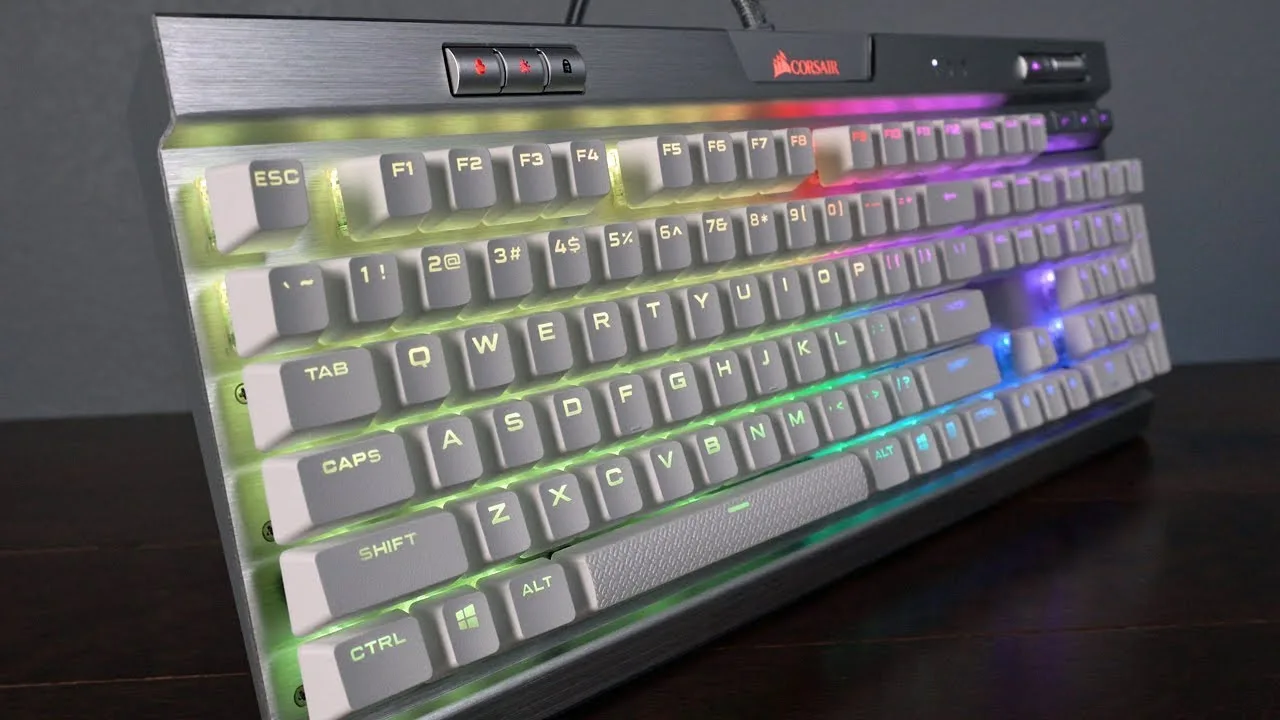
The Corsair K70 RGB MK.2 represents a meaningful upgrade to Corsair's flagship keyboard line, incorporating features from the premium K95 Platinum at a more accessible price. The special edition reviewed features a striking silver brushed aluminum backplate that dramatically enhances RGB lighting through reflection, paired with high-quality white PBT keycaps that create an impressive ambient glow. Build quality remains exceptional with virtually zero flex. The keyboard offers per-key RGB illumination with three onboard profile slots and extensive customization through Corsair's robust iCUE software. New additions include dedicated profile, brightness, and gaming mode buttons, plus improved cable routing. However, the special edition locks users into Cherry MX Speed switches with their short 1.2mm actuation, which the reviewer found overly sensitive for typing-intensive workflows. The removable plastic wrist rest also feels dated compared to rubberized alternatives.
- →Ideal for gamers prioritizing fast actuation and RGB aesthetics
- →Choose standard edition for typing with brown, blue, or silent switches
- →Special edition best for dedicated gaming setups with heavy RGB use
- →PBT keycaps eliminate need for aftermarket upgrade
- →Consider K95 Platinum if premium wrist rest is essential
 TechteamGB
The K70 RGB MK.2 sits in the mid-to-high range of mechanical gaming …
TechteamGB
The K70 RGB MK.2 sits in the mid-to-high range of mechanical gaming …
The K70 RGB MK.2 sits in the mid-to-high range of mechanical gaming keyboards, featuring individually addressable per-key RGB lighting controlled through Corsair iCUE software. The reviewer tested the Cherry MX Bronze variant and appreciated the metal volume roller, dedicated media keys, and included gaming keycaps with key puller. A USB passthrough port provides full-speed data transfer, though it requires two USB-A connections. The attachable wrist rest uses a firm soft-touch coated plastic design. Build quality remains solid with rubber feet and adjustable tilt legs. However, the reviewer found the switch spacing slightly wider than preferred, making the typing experience less comfortable than their Cooler Master Master Keys Pro L—a subjective preference. The cable routing channels on the underside feature an unusual cross-patterned center design of questionable utility.
- →Ideal for gamers wanting premium RGB without flagship price
- →Choose switch type carefully—Cherry MX Bronze tested here
- →Typing feel may not suit those preferring tighter spacing
- →Good option if dedicated macro keys aren't needed
- →Verify regional layout availability before purchasing
 JoesTech
The reviewer examines the Corsair K70 RGB MK.2, highlighting its …
JoesTech
The reviewer examines the Corsair K70 RGB MK.2, highlighting its …
The reviewer examines the Corsair K70 RGB MK.2, highlighting its brushed anodized aluminum frame designed for durability with lighter weight. The keyboard includes useful accessories like textured FPS/MOBA keycaps, a detachable wrist rest with quick-connect latches, and a keycap removal tool. Connectivity requires dual USB connections with a sleeved cable, plus a passthrough port and cable routing channels on the rear. Multimedia controls include an aluminum volume dial with smooth scrolling, profile switching keys, brightness levels, and Windows key lock. The Cherry MX Brown switches tested offered multiple switch options available. RGB implementation receives praise as consistently well-executed.
- →Excellent for gamers wanting premium build with switch customization
- →Ideal for productivity users needing detachable wrist rest flexibility
- →Great for clean desk setups with built-in cable management
- →Perfect for RGB enthusiasts wanting consistent lighting quality
- →Suited for competitive gamers needing Windows key lock function
 Carson Cameron Clark
The reviewer evaluates the Corsair K70 RGB MK.2 as a solid mechanical …
Carson Cameron Clark
The reviewer evaluates the Corsair K70 RGB MK.2 as a solid mechanical …
The reviewer evaluates the Corsair K70 RGB MK.2 as a solid mechanical keyboard with meaningful upgrades over the previous K70 Lux. Key improvements include hardware playback for portable macros, a more premium-looking silver volume wheel, raised media keys for easier access, an enlarged padded wrist rest addressing prior size complaints, and built-in cable management. The aluminum case construction and Cherry MX Brown switches provide excellent typing feel. Dedicated controls for Windows lock, brightness adjustment, and macros add convenience. However, the reviewer notes these changes don't fully justify the price increase from the previous model. The textured space bar and thin ABS keycaps are adequate but unexceptional.
- →Ideal for gamers wanting dedicated media controls
- →Good upgrade for rubber dome keyboard users
- →Consider cheaper K70 Lux if macros aren't needed
- →Wrist rest now comfortable for extended sessions
- →Try switch types before buying if possible
 GMODISM
After two years of daily use, the reviewer finds the K70 MK.2 to be a …
GMODISM
After two years of daily use, the reviewer finds the K70 MK.2 to be a …
After two years of daily use, the reviewer finds the K70 MK.2 to be a durable, well-built keyboard with satisfying mechanical switches and convenient media controls. The silent Cherry MX switches, however, proved disappointingly loud despite their name, requiring DIY modifications (o-rings, blue tack on stabilizers, flipped spacebar) to reduce noise. The aluminum chassis amplifies sound and has uncomfortably sharp edges that caused minor injury. iCUE software is described as frustrating to use, and the single USB passthrough proves insufficient for multiple peripherals. The keyboard excels for gaming with features like Windows key lock, though the ergonomic wrist rest was avoided due to durability concerns.
- →Best suited for gaming, not professional writing
- →Expect to modify stabilizers for acceptable noise levels
- →Consider standard MX Red if silence is priority
- →Single USB port limits peripheral connectivity
- →Flip spacebar for improved thumb ergonomics
 Tech Gear Talk
The reviewer praises the K70 RGB MK.2 as a premium full-size …
Tech Gear Talk
The reviewer praises the K70 RGB MK.2 as a premium full-size …
The reviewer praises the K70 RGB MK.2 as a premium full-size mechanical keyboard with aircraft-grade anodized brushed aluminum construction. Cherry MX Red switches provide smooth, quiet linear response suitable for gaming and productivity. Per-key RGB backlighting with 16.7 million colors and upgraded RGB Corsair logo offer extensive customization through iCUE software. Dedicated volume controls, multimedia keys, USB pass-through, and included FPS/MOBA keycaps add practical functionality. 8MB onboard storage saves profiles without software. The large typeface allows excellent LED light transmission through keycaps. Build quality is described as lightweight yet durable, with 100% anti-ghosting and full-key rollover ensuring accurate input registration.
- →Excellent choice for gamers wanting quiet linear switches
- →Ideal for users prioritizing extensive RGB customization options
- →Well-suited for productivity tasks requiring numpad functionality
- →Great for those wanting premium build without software dependency
- →Consider desk space requirements before purchasing full-size board
 Linus Tech Tips
The reviewer expresses initial excitement for the K70 RGB MK.2 but …
Linus Tech Tips
The reviewer expresses initial excitement for the K70 RGB MK.2 but …
The reviewer expresses initial excitement for the K70 RGB MK.2 but quickly encounters frustration with Corsair's complex Utility Engine software, which requires a 142-page manual. The hardware itself impresses with standard 104-key layout, hardware polling rate switch, BIOS mode, three-level brightness toggle, Windows lock key, five media keys, textured metal volume wheel, and soft-touch rubberized wrist rest. The brushed aluminum backplate and braided dual USB power cord maintain Corsair's quality standards. The Cherry MX RGB implementation preserves untainted tactile characteristics of red, blue, and brown switches while making LEDs less susceptible to static discharge failure. However, the software's steep learning curve with profiles, modes, and endless reprogramming options proves cumbersome despite extensive capabilities.
- →Best for patient enthusiasts willing to master complex software
- →Ideal for users wanting extensive per-key reprogramming control
- →Suitable for those prioritizing build quality and Cherry MX feel
- →Not recommended for plug-and-play simplicity seekers
- →Consider only if RGB customization time investment appeals
 KreativEcke
The reviewer considers the Corsair K70 RGB MK.2 one of the best gaming …
KreativEcke
The reviewer considers the Corsair K70 RGB MK.2 one of the best gaming …
The reviewer considers the Corsair K70 RGB MK.2 one of the best gaming keyboards available. The MK.2 refresh adds an RGB-lit Corsair logo cutout at the top, relocated multimedia keys, and significantly expands switch options to include Cherry MX Red, Brown, Blue, Silent, and Speed switches. The unit tested features Red switches, which the reviewer finds ideal for gaming and adequate for typing, though lacking tactile feedback. Build quality is praised with an aluminum frame that enhances RGB brightness through reflection. The detachable wrist rest uses a secure clip mechanism superior to magnetic alternatives, though the rubber surface lacks padding comfort. Side-deploying feet provide stability but auto-collapse when sliding the keyboard laterally.
- →Choose Blue switches for tactile, clicky feedback
- →Speed switches ideal for competitive gaming performance
- →Silent switches recommended for noise-sensitive environments
- →Red switches offer best balance for gaming and typing
- →Premium build justifies investment for serious gamers
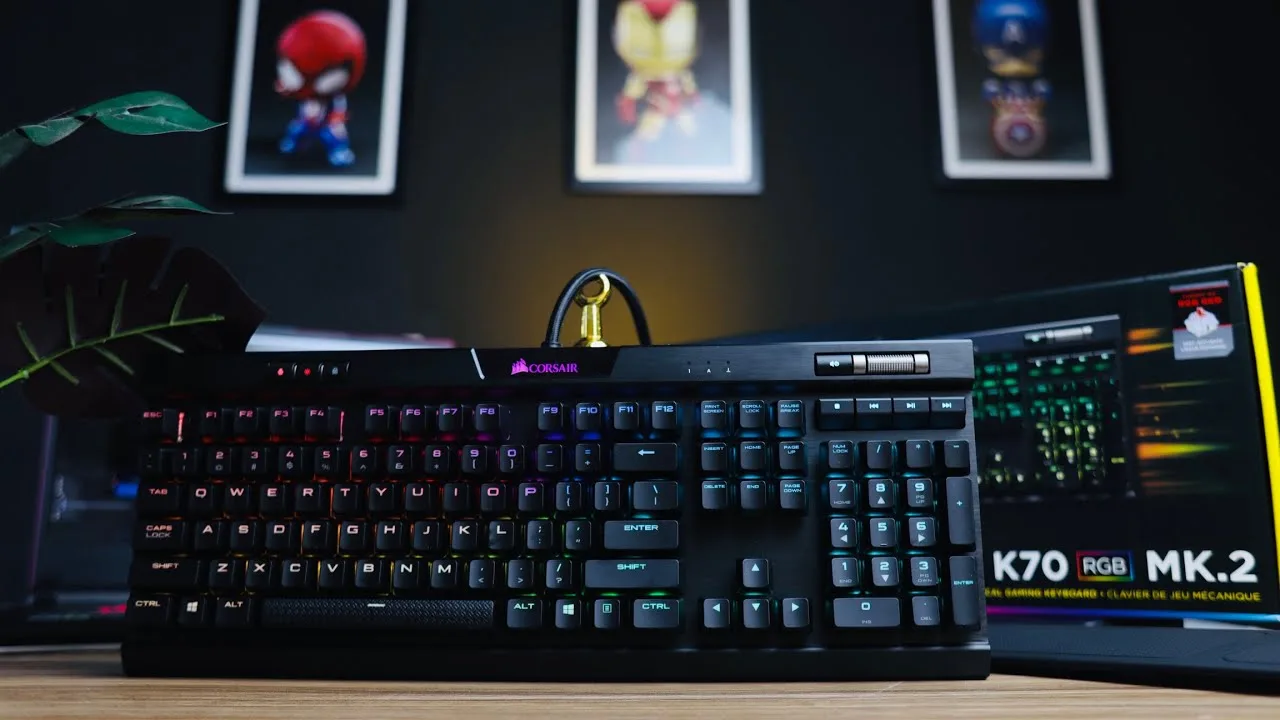 Rick Aqua
This aluminum-framed mechanical keyboard features Cherry MX Red …
Rick Aqua
This aluminum-framed mechanical keyboard features Cherry MX Red …
This aluminum-framed mechanical keyboard features Cherry MX Red switches with tactile feedback and fully customizable RGB lighting. The reviewer notes its solid, premium build quality with a detachable wrist rest, dedicated multimedia keys, volume wheel, and USB-C pass-through port. While the wrist rest feels plasticky rather than soft, the overall construction impresses with its durability and cold metallic touch. The iCUE software enables extensive lighting customization with onboard profile storage. At approximately $160, the reviewer finds it slightly expensive but justified by its premium feel. The wired design suits gamers prioritizing accuracy and response time, though the reviewer personally prefers wireless low-profile alternatives.
- →Ideal for gamers prioritizing speed and tactile feedback
- →RGB enthusiasts will appreciate extensive customization options
- →Best suited for wired setup users valuing response accuracy
- →Good fit for those wanting premium build quality
- →Consider alternatives if soft wrist rest or wireless is preferred
Scores based on weighted analysis of 18 expert and community sources. How we review →