

Monitors
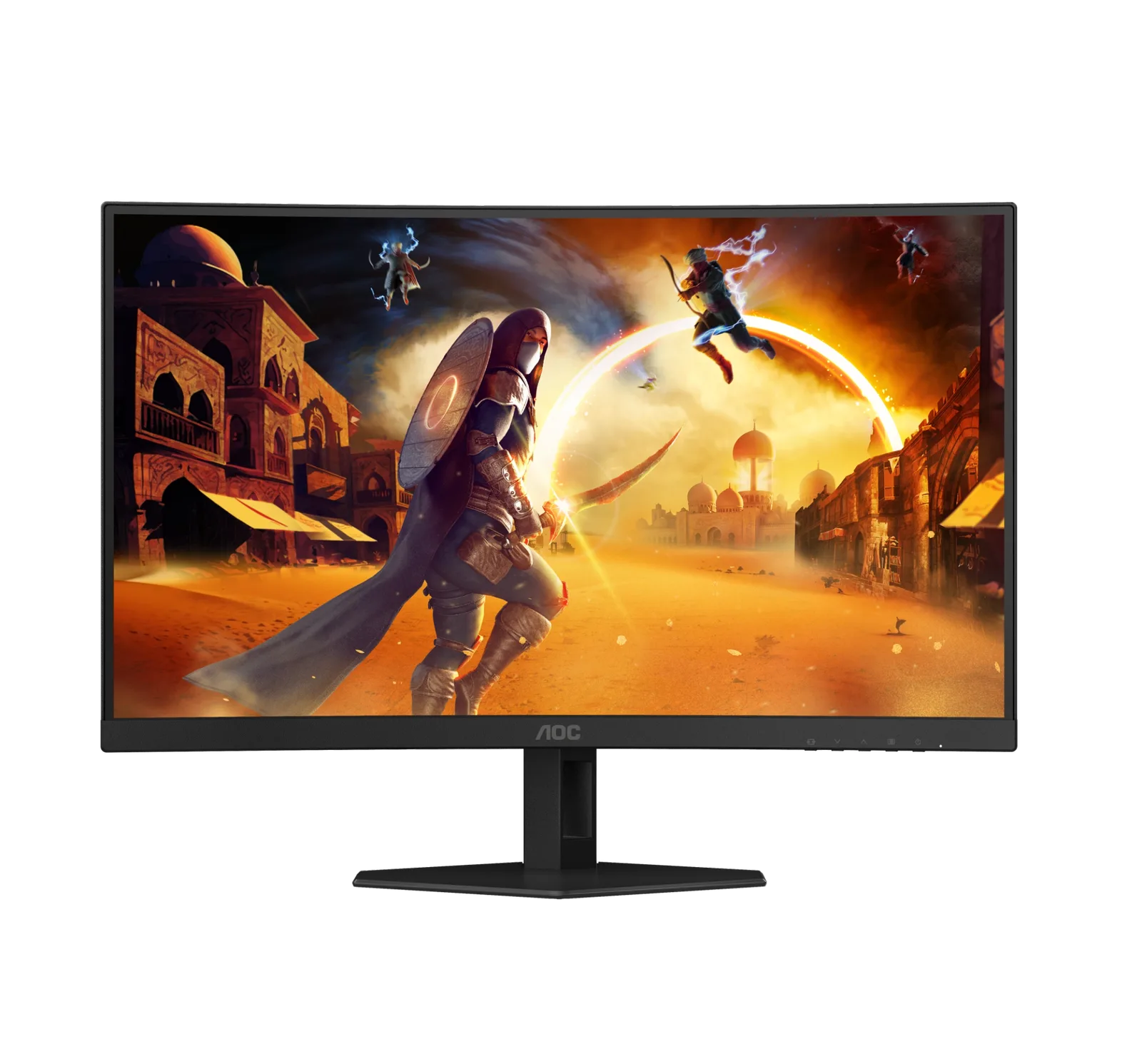
aoc gaming c27g4zxe
Best For
- Budget gamers needing high refresh rates
- Players seeking immersive 1500R curvature
- Shoppers after a 280Hz monitor on a tight budget
Consider Carefully
- Users requiring high-resolution displays
- Professionals needing color-accurate panels
- Gamers who prioritize build quality and connectivity
Jump to Section
The Bottom Line
The AOC Gaming C27G4ZXE is a budget gaming monitor built around speed. It delivers a 280Hz refresh rate and a 0.3ms response time, making it a practical pick for competitive and esports players who need smooth, low-lag visuals. The 1500R curvature adds a degree of immersion that flat panels at this price rarely offer. The trade-offs are real, though. A 1080p panel on a 27-inch screen means pixel density is low, and the VA panel can produce ghosting and smearing in fast-paced games. Build quality and connectivity are basic, with no USB hub and limited ergonomic adjustment. For the price, the speed credentials are hard to argue with, but buyers who care about sharpness or panel accuracy will want to look elsewhere.
Performance Breakdown
In-Depth Analysis
Refresh Rate Performance 100
Ten sources, zero dissent: 280Hz at this price is the whole reason this monitor exists. It's built for competitive gaming and nothing else.
Key Takeaway
→If competitive frame rates are your priority and your GPU is mid-range, this delivers the best Hz-per-dollar in its class.
VA Panel Quality 100
Six sources, no dissent: the VA panel's contrast is the best thing about this monitor. The 4000:1 ratio and deep blacks are legitimate strengths.
Key Takeaway
→If you game in a dark room and want rich contrast without paying IPS premium prices, the VA panel here genuinely delivers.
Curved Screen Immersion 75
The 1500R curve gets consistent praise across five sources, though reviewers note it serves single-player immersion more than competitive play.
Key Takeaway
→The curve is a genuine plus for single-player and dark-room gaming, but don't expect it to matter in competitive titles.
Panel Response Time 67
The spec sheet says 0.3ms GtG, but the VA panel underneath creates real ghosting concerns that three sources flag directly.
Key Takeaway
→If ghosting-free motion is non-negotiable for you, the VA panel here is a real liability worth comparing against IPS alternatives before buying.
Ergonomics & Build 66
The stand only tilts. No height adjustment, no swivel, and two sources call the overall build 'simplistic.' Budget cuts had to land somewhere.
Key Takeaway
→Factor in the cost of a monitor arm if ergonomics matter to you, because the stock stand won't get you where you need to be.
Connectivity Options 66
A 4-port USB 3.2 hub is a genuine convenience win, but PCGamer flags that without it the port selection is thin.
Key Takeaway
→The USB hub makes peripheral management easier than you'd expect at this price, but don't expect a full-featured connectivity suite.
Resolution & Sharpness 57
1080p on a 27-inch panel is a real compromise. Four sources flag it, and at this size the pixel density shows.
Key Takeaway
→If this is a dedicated gaming monitor and nothing else, the resolution trade-off is defensible. If you use your monitor for anything beyond games, look at 1440p alternatives.
HDR Performance 51
Two sources say to treat this as a non-HDR monitor. The HDR10 badge is real, the HDR performance is not.
Key Takeaway
→Disable HDR and use SDR mode. The VA panel's native contrast does more for image quality than the HDR10 implementation ever will.
Specifications & Verdict
Connectivity
- Audio Output
- Headphone out (3.5mm)
- Display Port
- 1x DisplayPort 1.4
- Hdmi Ports
- 2x HDMI 2.0
Display
- Aspect Ratio
- 16:9
- Backlight Type
- WLED
- Brightness
- 300 nits
- Contrast Ratio
- 4000:1
- Curvature
- 1500R
- Hdr Support
- HDR10
- Panel Type
- VA
- Refresh Rate
- 280 Hz
- Resolution
- 1920 x 1080
- Size
- 27 inches
Ergonomics
- Adjustments
- Tilt: -5 (+3/-0) ~ +18 (-3/+0)
- Vesa Wallmount
- 100x100
Features
- Availability
- July 2024
- Bezel Type
- 3-sided frameless
- Color Scheme
- Grey and black
- Common Features
- MBR Sync, Low input lag, Dynamic Dial Point, Shadow Control, Frame Counter, AOC G-Menu support
- Design
- stealth-fighter inspired angular design
- Game Mode
- FPS, RTS GAME MODE
- Input Lag Mode
- Low Input Lag
- Power Consumption Standby Watts
- 0.5
- Power Supply
- Internal
- Software
- AOC G-Menu
Performance
- Blue Light Technology
- Low Blue Light
- Response Time
- 0.3 ms MPRT, 1 ms GTG
- Static Contrast Ratio
- 4000:1
- Sync Technology Vrr
- Adaptive Sync
Physical
- Dimensions
- 613.9 x 460.4 x 177.4 mm including base
- Weight
- 3.62kg without stand, 4.41kg with stand
Our Verdict
The AOC Gaming C27G4ZXE is a solid choice for budget-conscious gamers who prioritize refresh rate and response time over resolution and panel quality. However, for those who demand higher pixel density, better build quality, or more connectivity options, this monitor may fall short.
Customer Reviews Amazon
194 reviews
Çok iyi
Great price great product
Broken
fps oyunları için mükemmel
Show all 5 reviews
super
Reviews shown are from Amazon customers and do not reflect our editorial assessment.
Pricing & Availability
Updated Feb 18, 2026aoc gaming c27g4zxe
Sources & Methodology
Every score is built on evidence. This review synthesizes 16 independent sources — expert publications, video reviews, and community discussions — weighted by credibility, depth, and relevance.
Show detailed source analysis ↓ Hide source analysis ↑
Expert Reviews
pcgamer.com
Top
3/5-point
The AOC Gaming C27G4ZXE is an affordable 280 Hz gaming monitor with a 1080p resolution, offering good value for budget-conscious gamers. Despite its low resolution and mediocre pixel response, the monitor's price point makes these shortcomings acceptable. It features a VA panel with better contrast than IPS, but this comes at the cost of worse response and viewing angles. The design is decent for the price, but the build quality and ergonomics are lacking, with only tilt adjustment available. Connectivity is basic, with two HDMI 2.0 ports and a DisplayPort input, but no USB hub.
Strengths
- +Pleasingly affordable for a 280 Hz monitor
- +Bright and punchy VA panel with good contrast
- +Nicely calibrated colors in default sRGB mode
- +Great latency for online shooters and esports
Weaknesses
- −Low resolution with 1080p panel
- −Medocre pixel response and viewing angles
- −Basic build quality and ergonomics
- −Limited connectivity without a USB hub
ictmirror.com
The AOC Agon C27G4ZXE is a gaming monitor that stands out with its 280Hz refresh rate and 0.3ms response time, ensuring sharp visuals and minimal lag. Its 1500R curvature enhances immersion, and the 1920x1080 resolution offers decent quality for its price. The VA panel provides good contrast and deep blacks, suitable for low-lighting games. However, it may suffer from ghosting and smearing effects in fast-paced games. The monitor also includes HDR 10, Adaptive Sync, and a variety of settings for customization.
Strengths
- +280Hz refresh rate for sharp gaming visuals
- +0.3ms response time minimizes lag and screen tear
- +1500R curvature for immersive gameplay
- +1920x1080 resolution at an affordable price
Weaknesses
- −VA panel may experience ghosting and smearing in fast-paced games
herosweb.com
The AOC Gaming C27G4ZXE is a budget-friendly 27-inch gaming monitor with a 1080p resolution and 280 Hz refresh rate, making it suitable for esports and fast-paced gaming. It offers a decent image quality with good contrast and color calibration in SDR mode, but its HDR performance is lackluster. The monitor has a modest design and limited ergonomics, with only tilt adjustment available.
Strengths
- +Affordable price point for a 280 Hz gaming monitor
- +Good contrast and color calibration in SDR mode
- +Responsive with a 280 Hz refresh rate, ideal for esports
Weaknesses
- −Limited to 1080p resolution resulting in modest pixel density
- −VA panel has worse response times and viewing angles compared to IPS
- −Basic HDR10 support with limited effectiveness
- −Simplistic design and limited ergonomics
techpowerup.com
The AOC GAMING C27G4ZXE is a 27-inch curved monitor designed for entry-level and budget-conscious gamers. It features a 280 Hz refresh rate, 1500R curvature, and a 1 ms GtG response time for clear motion. With a contrast ratio of 4000:1 and 300 nits brightness, it offers vivid visuals and deep blacks. The monitor also includes built-in speakers and a 4-port USB 3.2 hub for convenient connectivity.
Strengths
- +280 Hz refresh rate for smooth gameplay
- +1500R curvature for enhanced immersion
- +1 ms GtG response time for clear motion
- +4000:1 contrast ratio for vivid visuals
thefpsreview.com
The AOC GAMING C27G4ZXE is a 27-inch curved gaming monitor that offers an immersive gaming experience with its 1500R curvature and 280 Hz refresh rate. It features a fast VA panel with a 0.3-millisecond response time and HDR10 support, providing deep blacks and vibrant colors. Connectivity includes HDMI 2.0 ports and DisplayPort 1.4, while its Full HD resolution balances visual clarity with performance.
Strengths
- +1500R curvature for immersive gaming
- +280 Hz refresh rate for smooth gameplay
- +0.3 ms response time reduces motion blur
- +Full HD resolution for optimal performance
Pcgamesn
The C27G4ZXE targets budget-conscious esports gamers with a thoughtful stand design that maximizes desk space. Its compact, flat base measures just 177mm by 280mm with angled front corners, offering more room for peripherals than typical V-shaped alternatives. The 27-inch VA panel delivers 1080p resolution, 280Hz refresh rate, and 1ms response time with 0.5ms MPRT via backlight strobing. A 4000:1 contrast ratio produces deep blacks, though adaptive sync is included. The stand's simplicity trades ergonomics for stability—it only offers tilt adjustment, lacking height, swivel, or pivot options. Priced at £219.99, it launches July 2024.
Strengths
- +Compact stand design maximizes desk space for peripherals
- +280Hz refresh rate with 1ms response time
- +4000:1 contrast ratio delivers deep blacks
- +Flat, stable base prevents tipping accidents
Weaknesses
- −Stand lacks height adjustment beyond tilt
- −VA panel traditionally slower than alternatives
- −Only 1080p resolution on 27-inch display
- −May require monitor arm or riser for proper positioning
Notebookcheck
AOC's C27G4ZXE targets competitive gamers prioritizing speed over resolution. The 27-inch curved monitor (1500R radius) delivers 280 Hz refresh rate via Fast-IPS panel with 0.03 ms MPRT and 1 ms GtG response times. However, the 1920x1080 resolution limits sharpness. Adaptive-Sync support prevents tearing. At €269, it offers accessible high-refresh gaming for less powerful systems where achieving 280 Hz at higher resolutions would be difficult. The compact desk-friendly size and pronounced curve aim to enhance immersion, though the FHD limitation makes this a specialized choice for esports-focused users rather than those seeking visual fidelity.
Strengths
- +280 Hz refresh rate enables extremely smooth gameplay
- +Fast 0.03 ms MPRT and 1 ms GtG response times
- +1500R curvature enhances gaming immersion
- +Compact 27-inch size fits standard desks well
Weaknesses
- −1920x1080 resolution lacks sharpness for modern standards
- −Limited appeal beyond competitive gaming use cases
Video Reviews
 ModArt PC
The AOC C27G4ZXE monitor stands out with its 280Hz refresh rate and …
ModArt PC
The AOC C27G4ZXE monitor stands out with its 280Hz refresh rate and …
The AOC C27G4ZXE monitor stands out with its 280Hz refresh rate and 0.3ms response time, making it a compelling choice for gamers seeking high performance. Its detailed video review highlights these features, showcasing the monitor's capabilities.
- →Ideal for fast-paced gaming
- →High refresh rate benefits competitive players
- →Quick response time for clear visuals
 Vistazo Veloz
The reviewer seems to be satisfied with the AOC Gaming C27G4ZXE, …
Vistazo Veloz
The reviewer seems to be satisfied with the AOC Gaming C27G4ZXE, …
The reviewer seems to be satisfied with the AOC Gaming C27G4ZXE, utilizing it for various multimedia activities such as creating YouTube content, music with Logic Pro, and gaming. The review, however, lacks specific details about the monitor's performance and features.
- →Used for creating YouTube content
- →Suitable for music production with Logic Pro
- →Appropriate for gaming
 Ibrahim
The AOC Gaming C27G4ZXE monitor offers an impressive 280Hz refresh …
Ibrahim
The AOC Gaming C27G4ZXE monitor offers an impressive 280Hz refresh …
The AOC Gaming C27G4ZXE monitor offers an impressive 280Hz refresh rate for smooth gaming experiences. It boasts a 27-inch screen size with a 1500R curvature that provides an immersive viewing experience. The monitor's USB-C connectivity makes cable management easier and supports a range of devices.
- →Ideal for gamers needing high refresh rates
- →Curved screen enhances immersion
- →USB-C port simplifies setup with multiple devices
Scores based on weighted analysis of 16 expert and community sources. How we review →